
Voiset
vs
Motion
Best Motion alternative for work and life

The simpler Motion alternative, at a fraction of the price

Looking for a Motion alternative?
Motion plans your work projects. Voiset holds your whole day: work, clients and family, each in its own workspace, all on one calendar you control. Tasks, calls and booking pages are ready the minute you sign up.
€9.99 / mo for 5 seats
Booking pages
Voice tasks in 55 languages
Works with Claude & ChatGPT
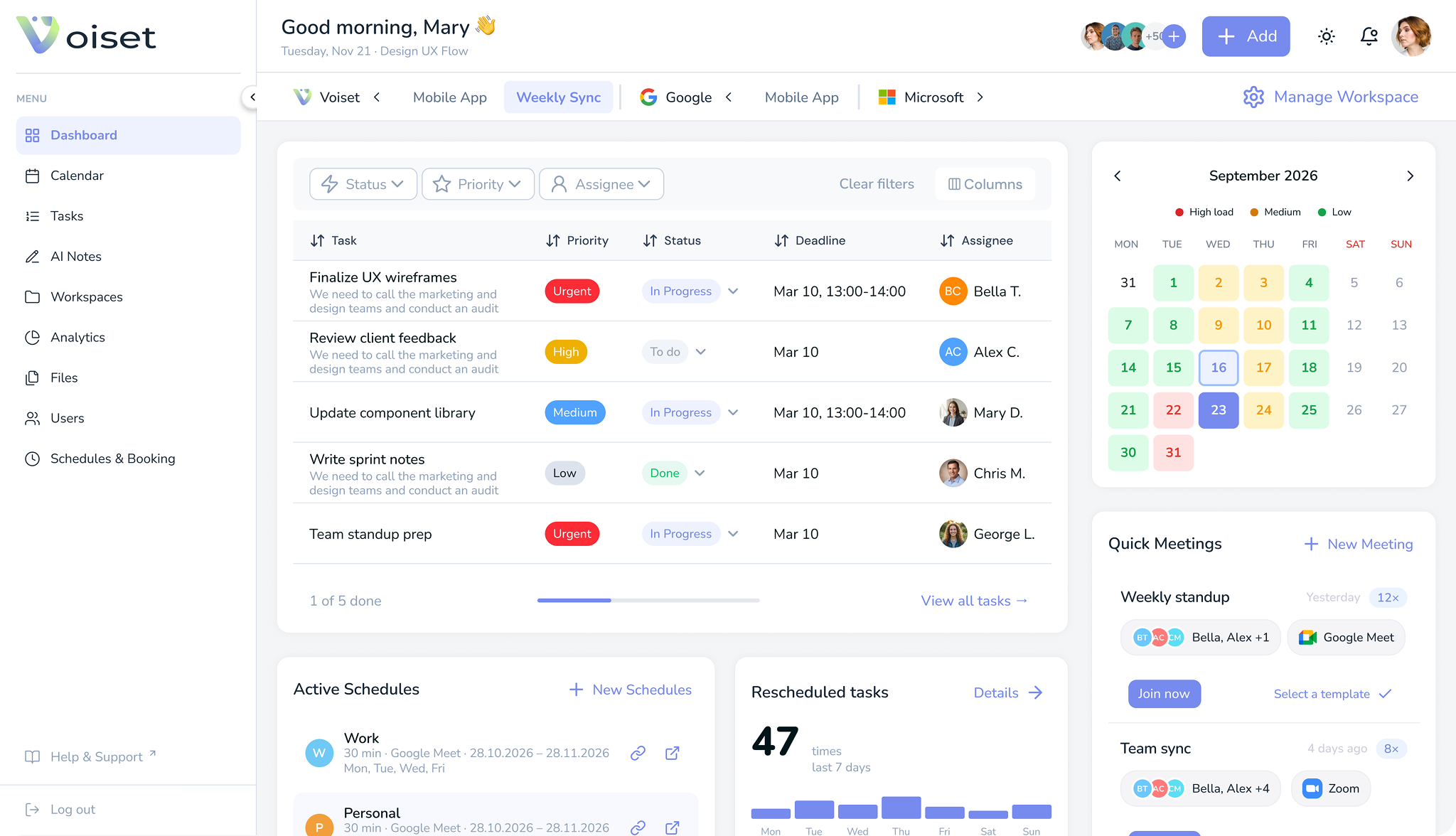
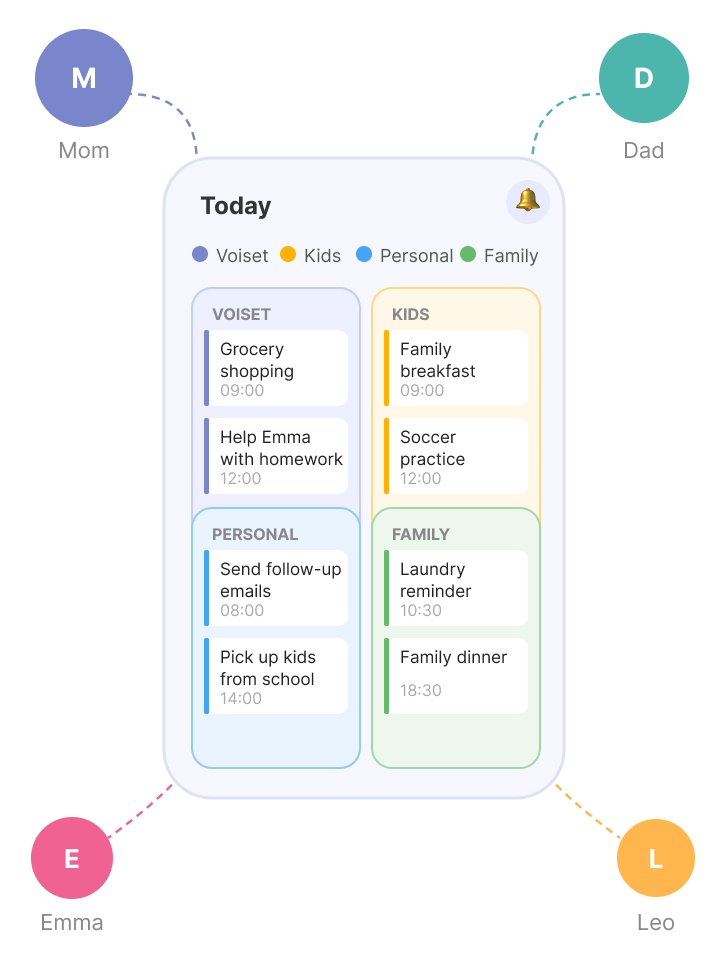
Voiset calendar dashboard on desktopVoiset calendar in the mobile app
Different tools, different jobs

Built for your day, not for project charts

Motion is made for teams that run long projects. Voiset is made for people and teams who need their tasks, calls and bookings in order today. That is the first thing to check when you compare Motion alternatives.

Best for individuals and growing teams

Choose Voiset if you

Capture tasks by voice, on the web or on your phone
Book calls with clients and share booking pages
Plan in your own language, not only in English
Want a calendar that works without Google or Outlook
Like to see conflicts and decide what moves yourself
Want one plan for up to 50 people, not a bill for every seat
Best for project-heavy teams

Choose Motion if you

Run long projects with stages, dependencies and Gantt charts
Are ready to connect Google, Microsoft or Apple Calendar first
Work in English only
Are fine with the app moving tasks for you
Budget $29 or more per person every month
Feature comparison

Voiset vs Motion at a glance

Full support
Partial or limited
Not available
Price
Voiset
Motion
Price, billed monthly
€9.99 / mo
Base plan, up to 5 users
$29 / mo
Pro AI, per seat
Team of 5, billed monthly
€9.99 / mo
Base plan, 5 users included
$145 / mo
Pro AI, 5 seats
Team of 10, billed monthly
€15.99 / mo
Advanced plan, 10 users included
$290 / mo
Pro AI, 10 seats
Free trial
14 days
All features
7 days
Pro AI
Where they differ
17 of 29
Built-in calendar, no setup
Voiset keeps tasks, events and calls in its own calendar. Motion’s calendar holds tasks; events live in Google, Microsoft or Apple.
Tasks, events, calls
Tasks only
Booking pages from day one
Voiset booking pages work right after sign-up, each with its own link and embed code. In Motion they open once you link a calendar.
Ready on sign-up
Needs a linked calendar
Calls from a task
Schedule a Zoom, Google Meet or Teams call from the task form and the link is added for you.
Zoom, Meet, Teams
Through a calendar event
Best time to call
Voiset suggests 5 free slots that suit everyone on the call.
5 slots suggested
Through a booking link
Call templates
Smart Fill and Quick Meetings fill in call details in one tap.
Smart Fill, Quick Meetings
Not available
Contacts
Keep people and companies in Voiset and book a call from their card.
People and companies
Not available
Voice input in the app
Say a task out loud on web or mobile and Voiset fills in the date, time and priority.
Web and mobile
Not available
Interface languages
Use Voiset, its voice input and meeting assistant in your own language.
55 languages
English only
Meeting assistant with translation
Record a meeting, see who said what and translate it into another language.
Speakers and translation
English transcripts
Review before you save
Voiset shows conflicts before a task is saved and you decide what moves. Motion reshuffles the day on its own.
Conflict warnings
Moves tasks automatically
Day load at a glance
Each day is colored by how busy it is, and Voiset flags a busy day before you add more.
Load colors, Busy day
Not available
Calendar per workspace
See each workspace as its own column in the day view, with its own working hours.
Columns by workspace
Not available
Works with Claude and ChatGPT
Connect any MCP-compatible AI assistant and plan your tasks right from the chat.
MCP server
API and Zapier
Share a task, no sign-up
Send a link and anyone can open the task and work on it without an account.
Any task
Full access is a paid seat
Assign and accept tasks
Hand a task to a teammate and see when they accept it.
Appointed, Accepted
Not available
Telegram notifications
Get reminders and updates in Telegram.
Telegram bot
Not available
Flat pricing
One price per workspace with 5 seats included, instead of a fee for every person.
Per workspace
Per seat
What both have
12 of 29
AI daily planning
Task rescheduling
Priorities
Recurring tasks
Reminders
Comments and activity
File attachments
Google and Outlook sync
Team workspaces
Analytics
Data export
Mobile and web apps
Team cost calculator

Motion pricing vs Voiset: see what your team would pay

Motion charges for every seat. Voiset charges one price for the whole team. Move the slider to compare. If you are looking for cheaper Motion alternatives, compare the yearly cost below.

5
1 person50 people
Voiset
€9.99 / moBase plan, up to 5 users€119.88 a year
Motion
$145 / mo$29 per seat × 5 seats$1,740 a year
Limitations

Where Motion falls short

We tested both apps side by side. Here's what got in the way in Motion. If this sounds familiar, you are probably already looking at Motion AI alternatives.

Events and booking need another calendar

Motion won’t create an event or a booking link until you connect Google, Microsoft or Apple Calendar.

In Voiset
Calendar, calls and booking pages work right after sign-up.

You pay for every seat

Pro AI is $29 per person a month, so a team of 5 pays $145. AI runs on credits, and extra credits cost more.

In Voiset
Plans start at €9.99 a month for up to 5 users.

Your day changes without asking

Motion reshuffles tasks on its own. In our test it confirmed a 10:00 call in chat and then put it at 9:00.

In Voiset
You see conflicts before saving and decide what moves.

Voice capture depends on Siri

Motion has no mic button in its web app. Its help center describes voice capture only through Siri on iPhone, and nothing for Android.

In Voiset
Tap the mic on web or mobile and just say it.

The app speaks English only

No interface language setting, and meeting transcripts come in English. If you plan in another language, every task starts with a translation in your head.

In Voiset
55 languages for the app, voice and meeting notes.

The mobile app is a lighter version

Motion's help center lists project templates, saved views, bulk editing and Gantt charts as desktop only. If you plan from your phone, part of the product stays at your desk.

In Voiset
The mobile app is where voice planning starts.
Why switch

What you get when you switch to Voiset

Share a task, no sign-up

Send a task by link to a client or contractor. They open it in the browser and work on it right away, no account needed. In Motion, every teammate with full access is a paid seat.

Booking pages from day one

Share a link or embed it on your site. Clients pick a free slot, and the call lands in your calendar with a Zoom, Meet or Teams link.

Speak tasks and notes in your language

Just talk, in any of 55 languages. Voiset turns what you say into a task with a date, time and priority, or into a note you can plan later. No need to switch to English.

Works with any AI agent

Connect Claude, ChatGPT or any MCP agent and plan your tasks right in the chat you already use.

One price for the whole team

One monthly price covers up to 5, 10 or 50 users, depending on your plan. Assign tasks and see when a teammate accepts them.

See how busy each day is

Days are colored by load, and Voiset flags a busy day before you add more. Each workspace gets its own column.
Just say it.
Voiset plans it.

Turn a 10-second voice note into a scheduled task, right between your meetings.

Capture on the go

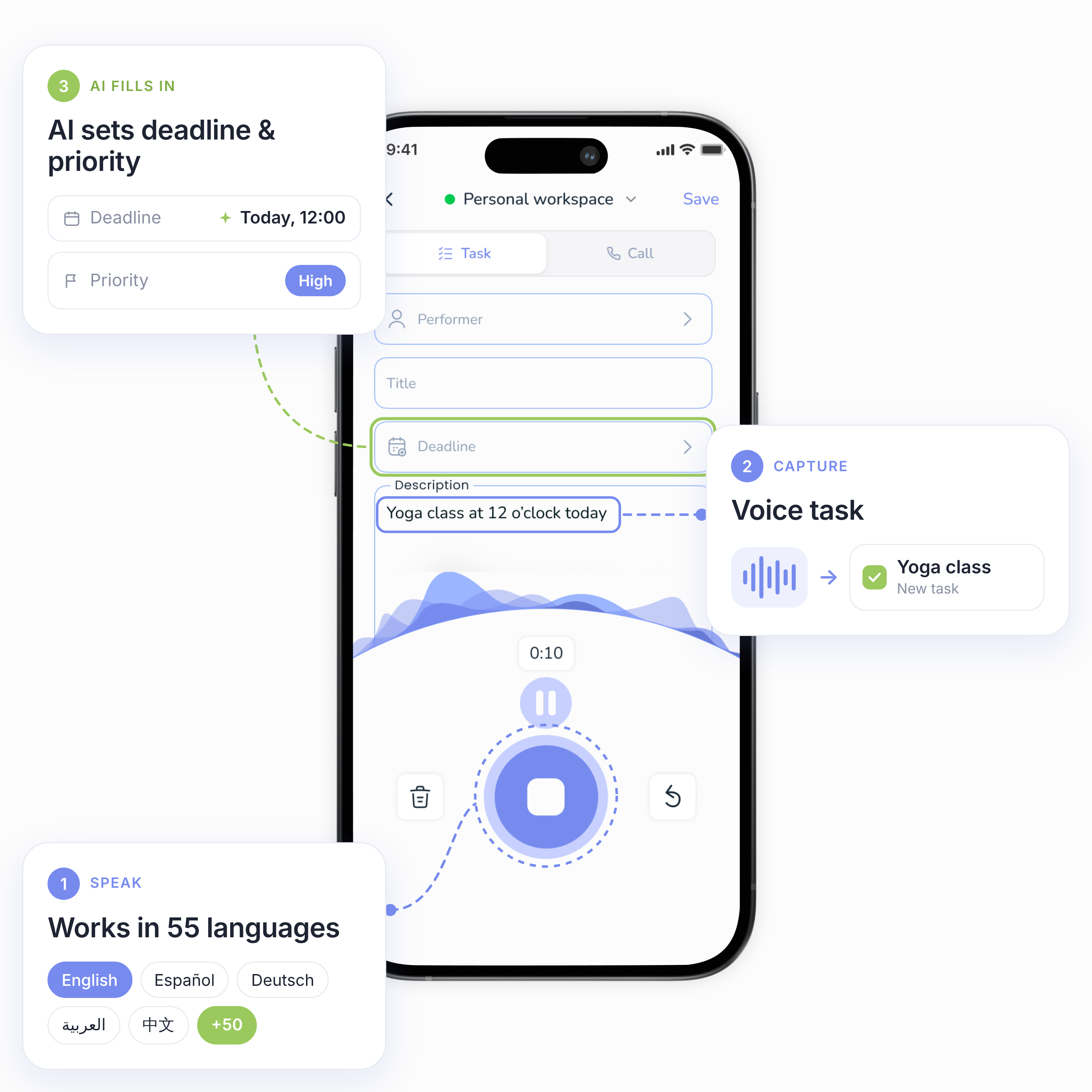
Tap the mic in the iOS or Android app and speak in any of 55 languages. Voiset sets the date, time and priority for you.

Notes now, tasks later

Not ready to plan yet? Say it as a note. When you are, Voiset turns your notes into tasks with a date and time in one tap.

Creating a task on the go with your voice
Switching is easy

Move from Motion in 5 minutes

1
1 min

Connect your calendars

Sign in with Google or Outlook: events sync in seconds.

Google Calendar
Outlook
Zoom
2
2 min

Import your tasks

Dictate your open tasks one by one, or drop them into AI Notes and turn each note into a scheduled task in one click.

0:10

Develop and implement a push notification system for the mobile app. Notifications should support personalization based on user behavior and be sent at the optimal time.

3
2 min

Plan your day

See tasks, calls and bookings on one calendar and decide what moves.

09:00
Stand-up
10:00
Finish Q3 report
12:00
Client call
13:30
Call Mike
Done in 5 minutes

Frequently asked questions

Is Voiset a good alternative to Motion?

+

Yes, if your day is more than work projects. Motion plans work tasks for teams. Voiset keeps work, clients and family in separate workspaces on one calendar, with calls, booking pages and notes built in. If you are comparing Motion alternatives, start with the feature table above.

What are the best Motion app alternatives?

+

It depends on what you need. Voiset is the Motion alternative for people who want tasks, notes, calls and booking pages on one calendar, at one price for the whole team. Other Motion app alternatives people compare are Reclaim, Sunsama, Akiflow and Morgen.

What's the main difference between Voiset and Motion?

+

Motion's AI rearranges your tasks for you. In Voiset you see your whole day, conflicts included, and decide yourself. AI takes the routine: it turns your words into dated tasks and suggests free slots for calls. See how voice to task works in Voiset.

Can I try Voiset before I pay?

+

Yes. Every plan comes with a 14-day free trial. Paid plans start at €9.99 per month. Compare all plans on the pricing page.

Can I move my tasks from Motion?

+

Yes. Connect the same Google or Outlook calendar and your meetings appear in Voiset in seconds. Then dictate your open tasks, and each one gets its date, time and priority.

How does Voiset decide when to schedule my tasks?

+

Voiset's AI reads what you say. “Tomorrow at 10” sets the date and time, “urgent” sets the priority. The task appears in your day, and you see at once if it clashes with something else. For calls, Voiset suggests the best free slots. Learn more about AI scheduling.

Can I still plan my day manually?

+

Yes. Drag any task to a new time in the calendar, or open it and change the date and time. You always have the final say.

What tools does Voiset work with?

+

Google Calendar, Outlook and Zoom. You can also connect Voiset to Claude, ChatGPT or any AI agent that supports MCP and manage your tasks right in the chat. Here's how to connect Voiset to Claude in two minutes.

Does Voiset work for teams?

+

Yes. Invite teammates to a shared workspace, assign tasks and set up calls in one click. You can share a single task by link with a client or contractor, and they don't need an account to work on it. Clients can also book time with you through booking links.

How do I get help?

+

Write to us through the contact page and the team will get back to you.

Built for people, proven by experience

The best feedback doesn’t come from metrics, but from those who use it every day. Teams, leaders, and individuals, all shaping a simpler, smarter way to plan.

48 reviews, 5/5 rating.

5 starsView all reviews

What we like best about Voiset is how effortlessly it turns voice notes into organized tasks and schedule reminders. Instead of stopping to type everything manually, we can simply speak an idea or to-do, and Voiset automatically structures it and adds it to our workflow.

Photo of Sean S.
Sean S.
Realtors of LYFE Marketing
Marketing and Advertising

What we like best about Voiset is how quickly it transforms voice notes into organized, actionable tasks. In a fast-moving business environment, ideas and client requests come up constantly throughout the day, and Voiset makes it easy to capture them instantly without interrupting workflow.

Photo of Sarra B.
Sarra B.
CEO
Information Services

What I like best about Voiset is how it combines AI-powered scheduling, voice task management, and team collaboration into one intuitive platform. As a Project Manager, it helps me organize tasks efficiently, track project timelines, and keep the entire team aligned without unnecessary complexity.

Photo of William C.
William C.
Project Manager
Marketing and Advertising
