Comparison Voiset vs Reclaim.ai: Which AI task manager is better in 2026?
Both tools use AI to manage your schedule, but they're built for very different workflows. Reclaim defends focus time in meeting-heavy calendars and syncs with Jira, Asana, and Slack. Voiset captures tasks by voice, plans your day automatically, and costs a fraction of the price for small teams.
1. Voiset is built for freelancers, solopreneurs, and small business teams who need AI-powered scheduling they can control with their voice - on any device, anywhere.
2. Reclaim.ai is the stronger choice for professionals already deep in Google Workspace or Outlook who need Focus Time defense, smart habits, and PM tool integrations like Jira or Asana.
3. The single biggest difference: Voiset has native voice-to-task input. Reclaim does not. For busy small business owners managing tasks on the go, that gap is hard to ignore.
4. On pricing: Voiset is more affordable for small teams. Reclaim's free plan is heavily limited, and paid tiers start at $10/user/month - which adds up fast.
5. Bottom line: if you run a business or work independently and want a planner that works as well on your phone as at your desk - Voiset wins. If your team runs on Google Workspace and needs deep PM sync, Reclaim may be the better fit.
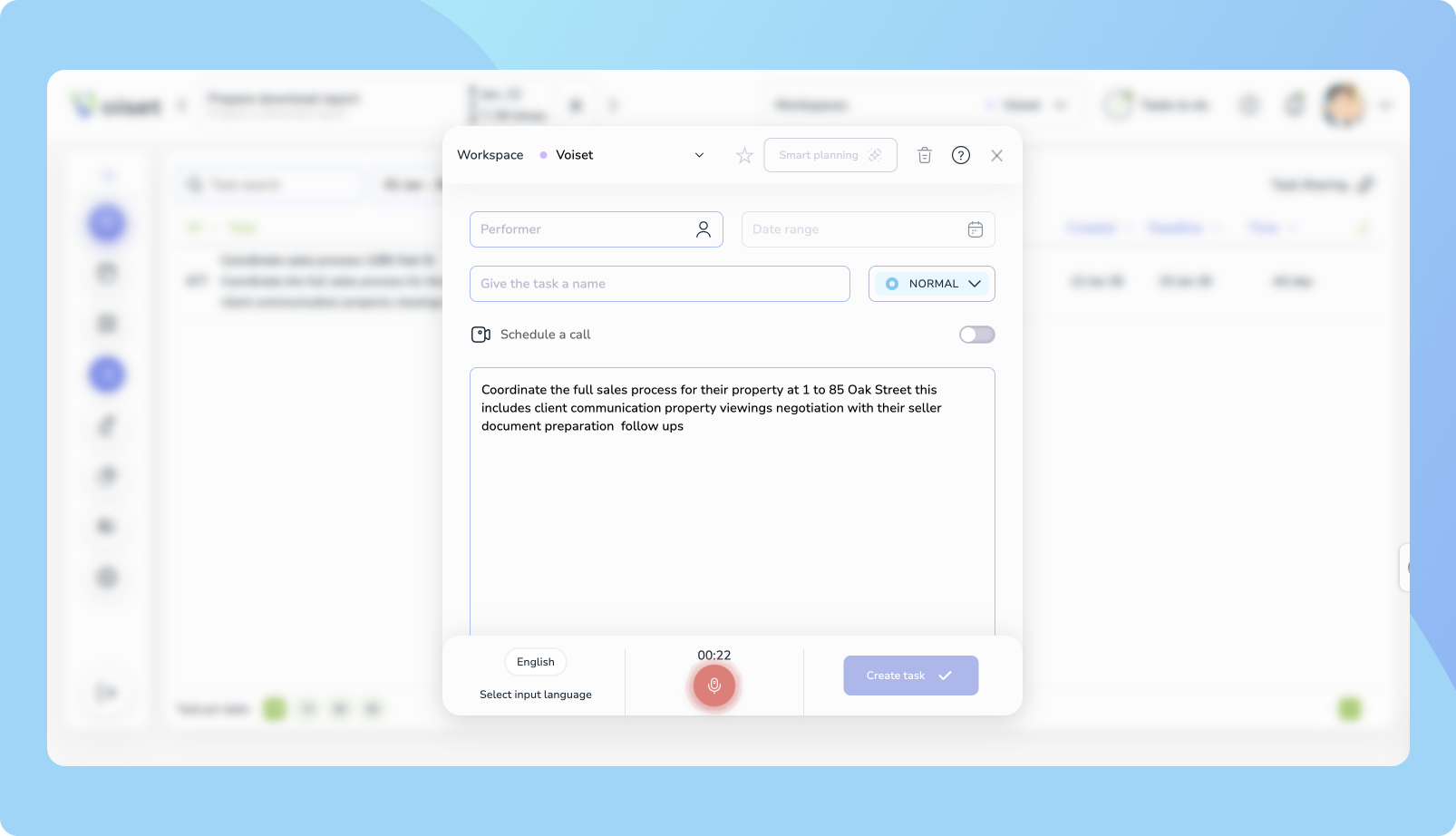
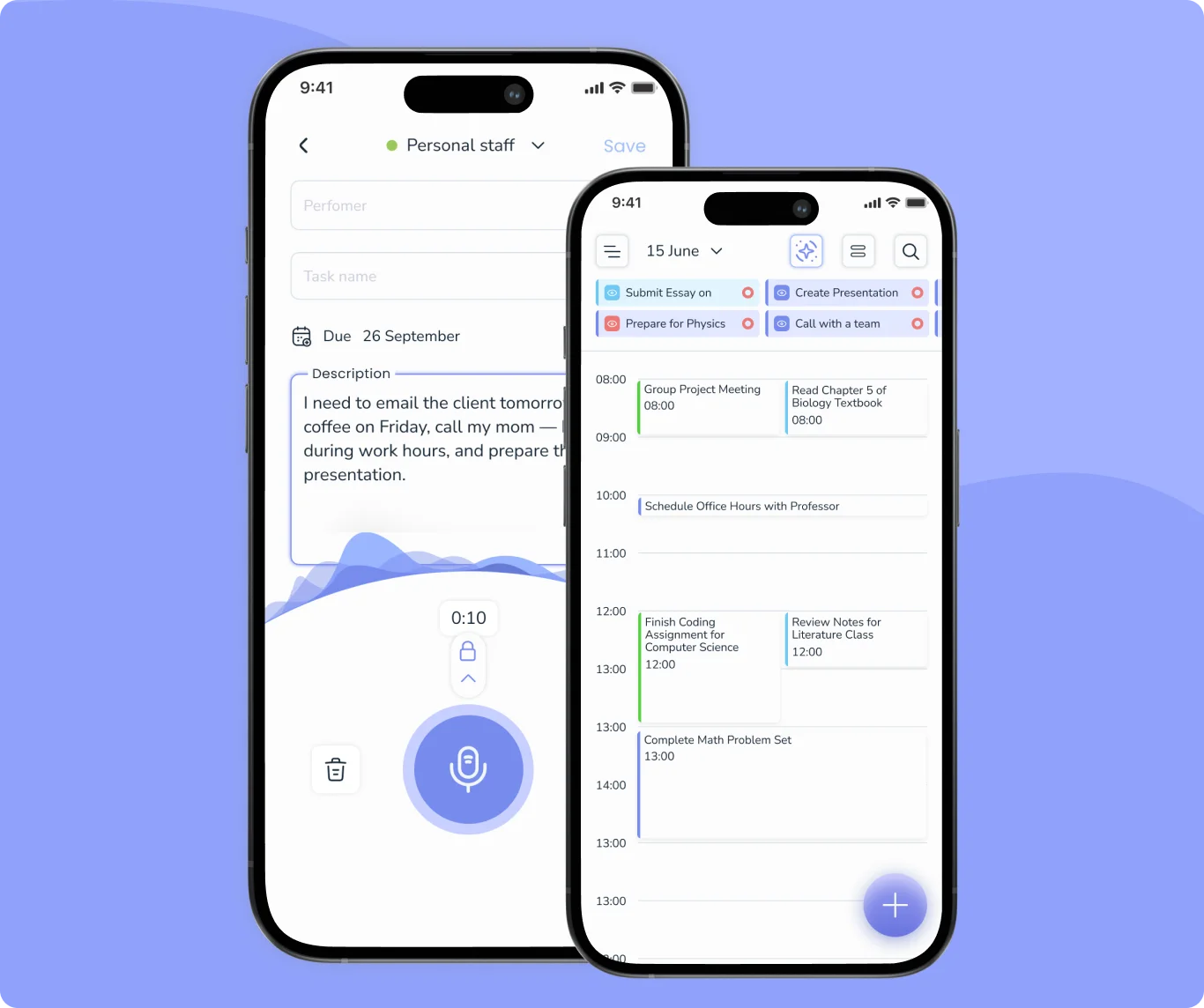
One feature that sets Voiset apart is voice-to-task input. You speak a note: "call the client back Thursday, high priority", and the app converts it into a structured task automatically.
The AI then takes over: it automatically schedules your tasks around your existing calendar, syncs with Google Calendar, Outlook, and Zoom, and pushes updates through a Telegram bot. Whether you're running a two-person agency, managing a field team, or working solo as a freelancer, Voiset keeps your day organized without demanding a steep learning curve.
Available on iOS, Android, and web, it's built for the way small business owners actually work, often away from a desk.
Voice-to-task input - create tasks by voice in one tap, across iOS, Android & web
AI calendar - automatically plans your tasks around your existing calendar
Workload visibility - see a colleague's availability before assigning a task
Native mobile app - full iOS & Android app, not a PWA
Booking system - share a link, let clients pick a time, task created automatically
Shared tasks via link - share any task with anyone, no Voiset account required
Google Calendar & Outlook sync - all events in one unified view
Workspaces - separate spaces for personal, work & team tasks
Telegram bot - task updates and reminders via Telegram
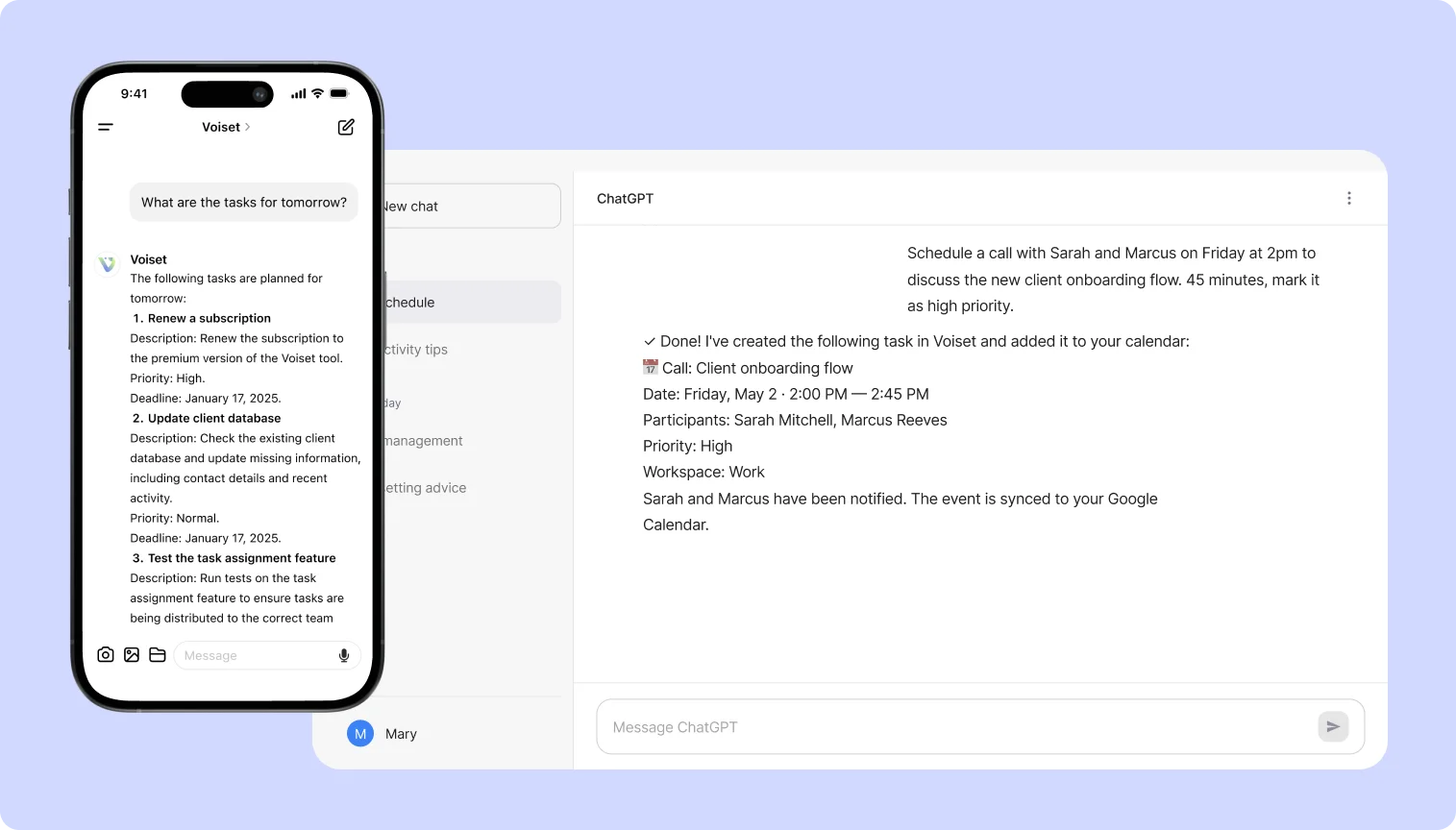
ChatGPT plugin - create tasks and notes directly from a ChatGPT conversation
Reclaim.ai is an AI scheduling tool built around one core idea: protect your calendar from being consumed by meetings.
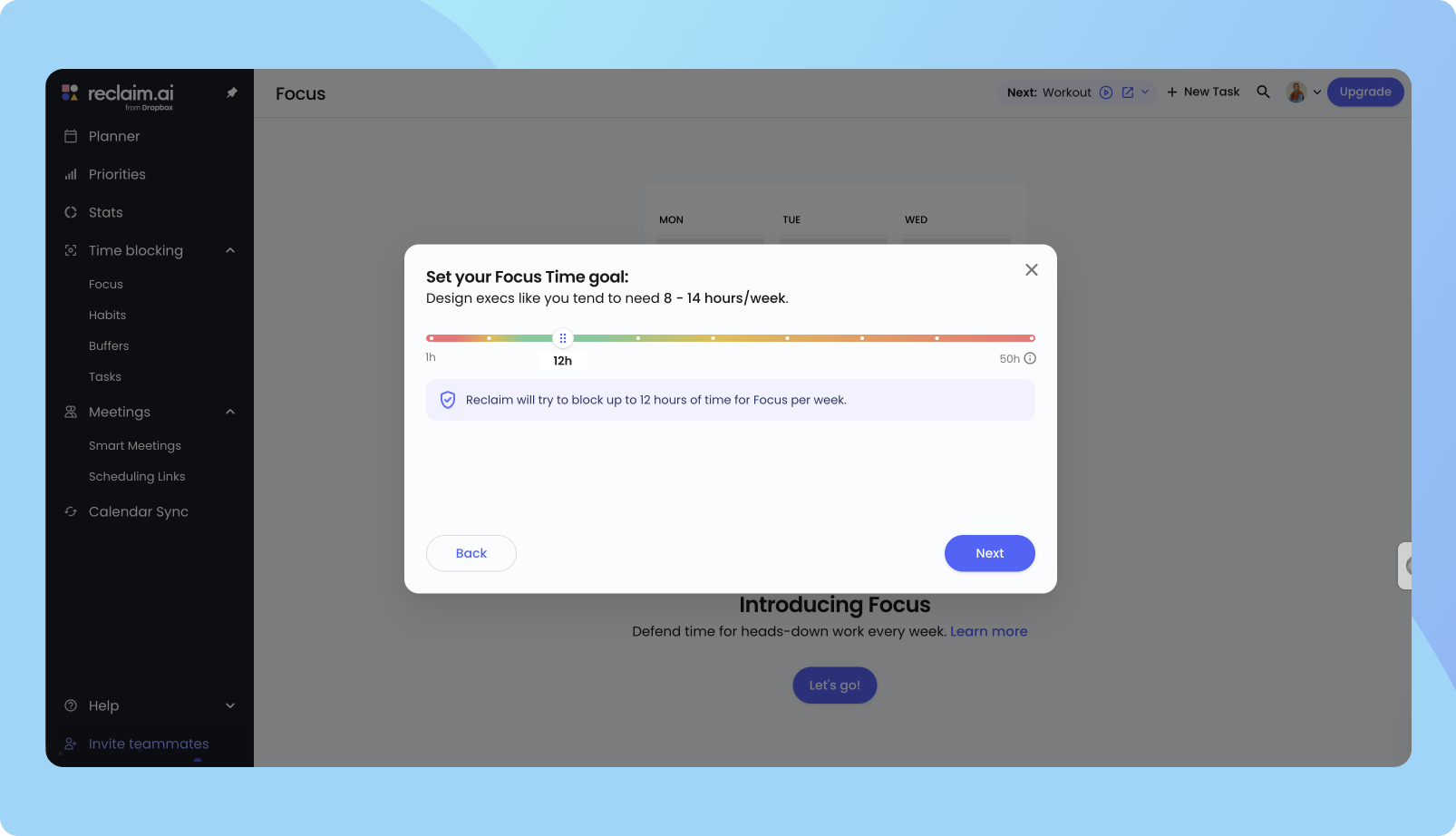
The product is strongest for professionals who already use Google Workspace and want their calendar to run itself. Set a "Focus Time" goal, define a few habits, like a daily review or a lunch break, and Reclaim finds the best slots for them throughout the week, rescheduling automatically when meetings get in the way.
Where Reclaim is less flexible: there's no voice input, no native mobile app, and the free plan is limited enough that most business users will need a paid tier fairly quickly.
Where Reclaim is less flexible: there's no voice input, no native mobile app, and the free plan is limited enough that most business users will need a paid tier fairly quickly.
AI Focus Time - automatically blocks deep work sessions
Smart Habits - schedules recurring routines around meetings
Smart Meetings - finds the best time across all attendees
Scheduling links with availability controls
Calendar sync across Google & Outlook accounts
Integrations with Asana, Jira, ClickUp, Todoist, Linear
Time tracking & productivity analytics
Voiset vs Reclaim.ai: Side-by-Side Comparison
Both tools aim to reduce the time you spend managing your schedule, but they approach the problem differently enough that the choice usually comes down to how you work, not just which features look good on paper. The table below covers the criteria that matter most for small business users: input method, mobile experience, pricing, team size, and workflow fit.
Who Should Use Voiset?
Voiset works best for people who manage a lot of moving parts but don't have time, or patience, to maintain a complex productivity system. It's a particularly good fit in these scenarios:
You're juggling multiple clients, capturing tasks between calls, and
don't want to spend 20 minutes a day managing a task list. Voice input
and AI scheduling handle the admin while you focus on billable work.
You need shared workspaces, task assignment across team members, and a
shared calendar view, without paying per-seat pricing for everyone.
Voiset's workspace model makes it cost-effective at this scale.
03
Field Workers & Mobile-First Teams
Real estate agents,
repair firms,
hospitality staff,
if your team works away from a desk, a native mobile app with voice
capture is more practical than a web-only tool that requires sitting
down to plan.
04
Agencies & Professional Services
Accounting agencies,
consultancies, and similar service businesses that need to track client
tasks, schedule meetings, and manage team workloads in one place,
without the overhead of a full project management tool.
Juggling lectures, deadlines, part-time work, and personal commitments.
Voice input means you can capture an assignment the moment it surfaces,
without stopping to open a laptop. AI autoplanning fits study sessions
into the gaps automatically.
An idea or task surfaces, and if you don't capture it in 10 seconds,
it's gone. Open the app, speak the thought out loud, and it's structured
and saved before the moment passes. No navigating menus, no friction
between the idea and the record of it.
Reclaim is a strong tool, just not for everyone. It earns its place when your work is structured around a calendar, your team lives in Google Workspace or Outlook, and you need automatic protection for focused work time rather than a way to capture tasks faster.
If your team runs on Google Workspace or Outlook, Reclaim is built to layer on top of these ecosystems without replacing them. It schedules around your existing events, syncs across accounts, and works in the background; you don't need to change how your team already operates.
If your tasks already live in Jira, Asana, or ClickUp - rather than asking you to move your workflow, Reclaim connects directly to your project management tool and schedules calendar time for those tasks automatically. It's one of the few AI scheduling tools that does this properly with bidirectional sync.
If your calendar is constantly overtaken by meetings, Reclaim's Focus Time feature automatically finds and protects blocks of deep work time — moving them around conflicts but ensuring they don't disappear. For managers or consultants whose calendars fill before they've done any real work, this is the core value proposition.
If you're managing a team of 10 or more,- per-seat pricing is easier to justify at larger team sizes, and Reclaim's Smart Meetings feature becomes genuinely useful when coordinating across more people's schedules. Team analytics also give managers visibility into meeting load and focus time across the whole group.
If your team communicates primarily through Slack, Reclaim syncs your calendar status to Slack automatically, so when you're in Focus Time or a meeting, your status updates without any manual input. Small thing, but it reduces the constant interruptions that come from colleagues not knowing whether you're available.
Voiset's AI looks at your existing calendar events, task deadlines, and priorities, then automatically finds the best slots to schedule work. You add a task, with a deadline and priority level, and the system fits it into your day without manual time-blocking. The autoplanning runs continuously, so if a meeting appears or a task moves, the schedule adjusts. It's designed to handle the planning so you don't have to think about it.
Reclaim.ai
Reclaim takes a slightly different approach: instead of just scheduling tasks forward, it actively defends time that already exists. Focus Time blocks are created and protected from meeting encroachment. Habits, like a daily review or a lunch break, are automatically placed at the best available slot each day. When something moves, Reclaim reschedules everything around it. It's less about task placement and more about preserving the structure of your workday.
Creation task by voice — Voiset's Key Differentiator
Voiset
Voice input is available across iOS, Android, and the web. You describe a task naturally — "follow up with the client on Thursday, mark it urgent", and Voiset extracts the title, deadline, and priority from what you said. There's no form to fill in, no screen to navigate. For people who are often away from a keyboard, between meetings, on a commute, or on a job site, this removes the friction that usually causes tasks to get forgotten rather than captured. The ChatGPT plugin extends this further: tasks and notes can be created directly from a ChatGPT conversation.
Reclaim.ai
The trade-off is in the day-to-day experience. Creating a task in Reclaim takes more steps than most users expect — you set a title, duration, priority, scheduling window, and deadline before the system can place it. For occasional, manageable tasks, and for teams capturing work throughout the day, the friction adds up.
Calendar Integrations
Voiset
Voiset syncs with Google Calendar, ChatGPT plugin, Outlook, and Zoom. External calendars are pulled into workspaces, so your meetings and personal events sit alongside your task list in a single view. Notifications and reminders are delivered via a Telegram bot, which is useful for teams that already use Telegram for communication. The integration set covers the essentials for business users, though it doesn't extend to project management tools.
Reclaim.ai
Reclaim's integrations go wider. Beyond Google Calendar and Outlook, it connects bidirectionally with Asana, Jira, ClickUp, Linear, Zoom, Todoist, and Google Tasks, pulling tasks from those tools into the calendar and syncing status changes back. Slack integration updates your status automatically based on what's on your calendar. For teams whose work is distributed across multiple tools, this depth of integration is one of Reclaim's strongest arguments.
Mobile App & On-the-Go Planning
Voiset
Voiset has a full native app on both iOS and Android. The mobile experience mirrors the desktop: you can add tasks by voice, view your schedule, manage workspaces, and check reminders, all from your phone. Beyond mobile, Voiset also works directly inside ChatGPT through a native plugin. A practical example: "Schedule a call with Emma and Thomas for Thursday at 3 pm to review the Q3 report." Voiset picks up the request, creates a structured task with the date, time, and context, and pushes it straight to your calendar, no copy-pasting, no app-switching, no manual entry. The event appears in your Voiset workspace and automatically syncs to Google Calendar or Outlook.
Reclaim.ai
Reclaim does not have a native mobile app. It offers a PWA (progressive web app), a web-based shortcut you can add to your home screen, but this lacks the performance, offline capability, and system-level integrations of a native app. Push notifications are less reliable, and the experience feels more like a mobile website than an app.
Team Collaboration & Workspaces
Voiset
Voiset organises work into separate workspaces - personal, work, team - each with its own calendar view and task list. Team members can be added to shared workspaces, tasks can be assigned, and everything sits in a unified master calendar that shows all workspaces together. Up to 50 users are supported on the Premium plan. The flat workspace pricing means a small team of five doesn't pay five separate subscriptions.
When assigning a task, Voiset shows the assignee's current workload so you can check capacity before confirming. Any task can be shared via a direct link — the recipient sees all the details without needing a Voiset account. For client scheduling, a built-in booking system lets clients pick an available slot that lands straight in your calendar.
Reclaim.ai
Reclaim's team features are focused on schedule coordination rather than task management. Smart Meetings finds the best available time slot for recurring team meetings, taking into account everyone's Focus Time and existing commitments. Team analytics give managers visibility into meeting load and focus time distribution. It's useful when the problem is getting people in a room at the right time, less useful when the problem is assigning and tracking work.
Ease of Use & Setup Time
Voiset
Setup is straightforward. Connect your Google or Outlook calendar, create a workspace, and start adding tasks, by voice or by typing. Most users have the basics working within a few minutes. The interface is clean enough that it doesn't require a manual to navigate, which matters for small business owners who aren't adopting productivity software as a project; they need it to work on day one.
Reclaim.ai
Reclaim has a moderate setup curve. Connecting the calendar is fast, but getting real value from the tool requires configuring Habits, setting Focus Time preferences, defining priority rules, and connecting any PM tools you use. Each of these adds configuration time upfront. The system becomes genuinely powerful once it's dialled in, but for small teams without dedicated time for onboarding, the first week can feel like more work than it saves.
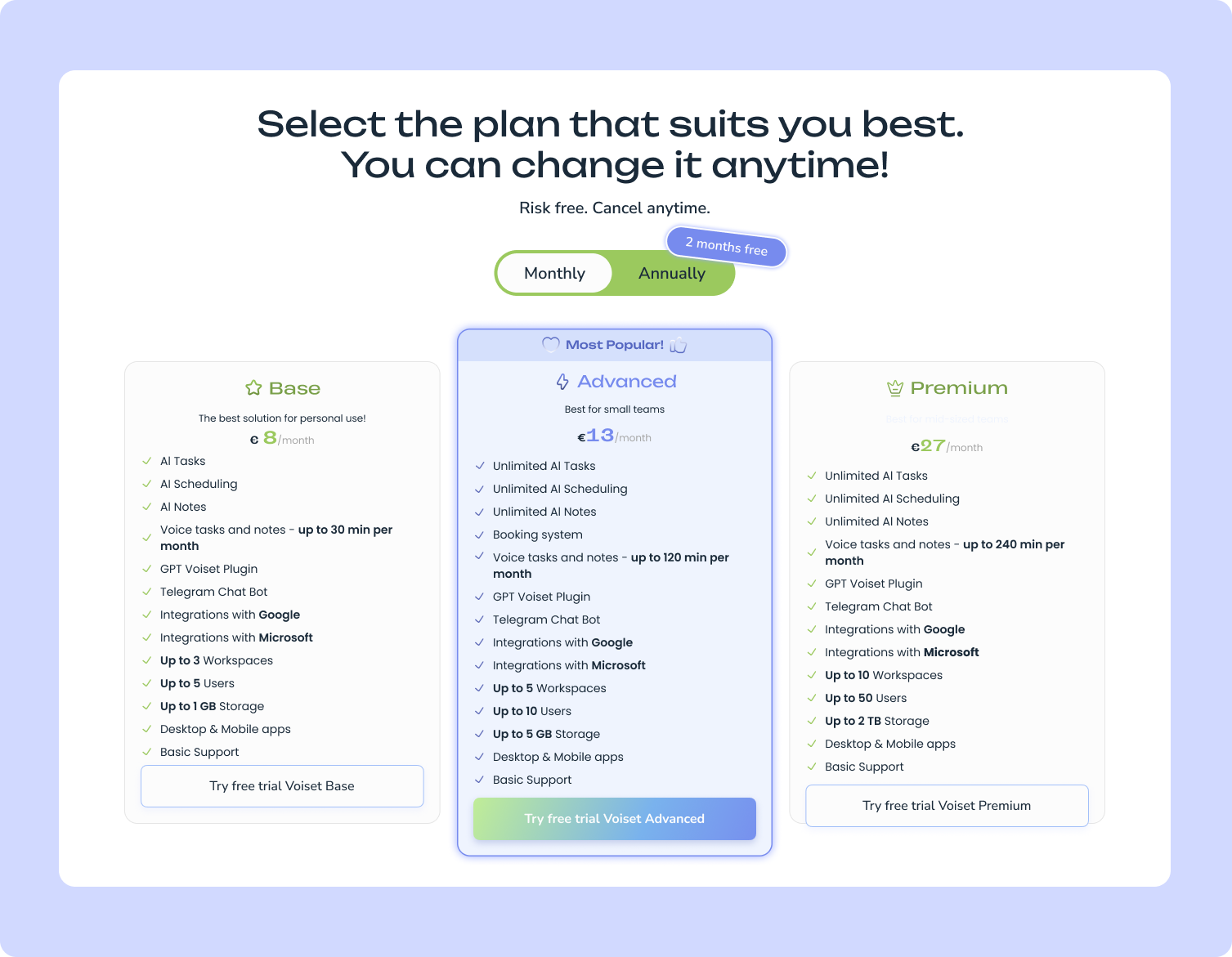
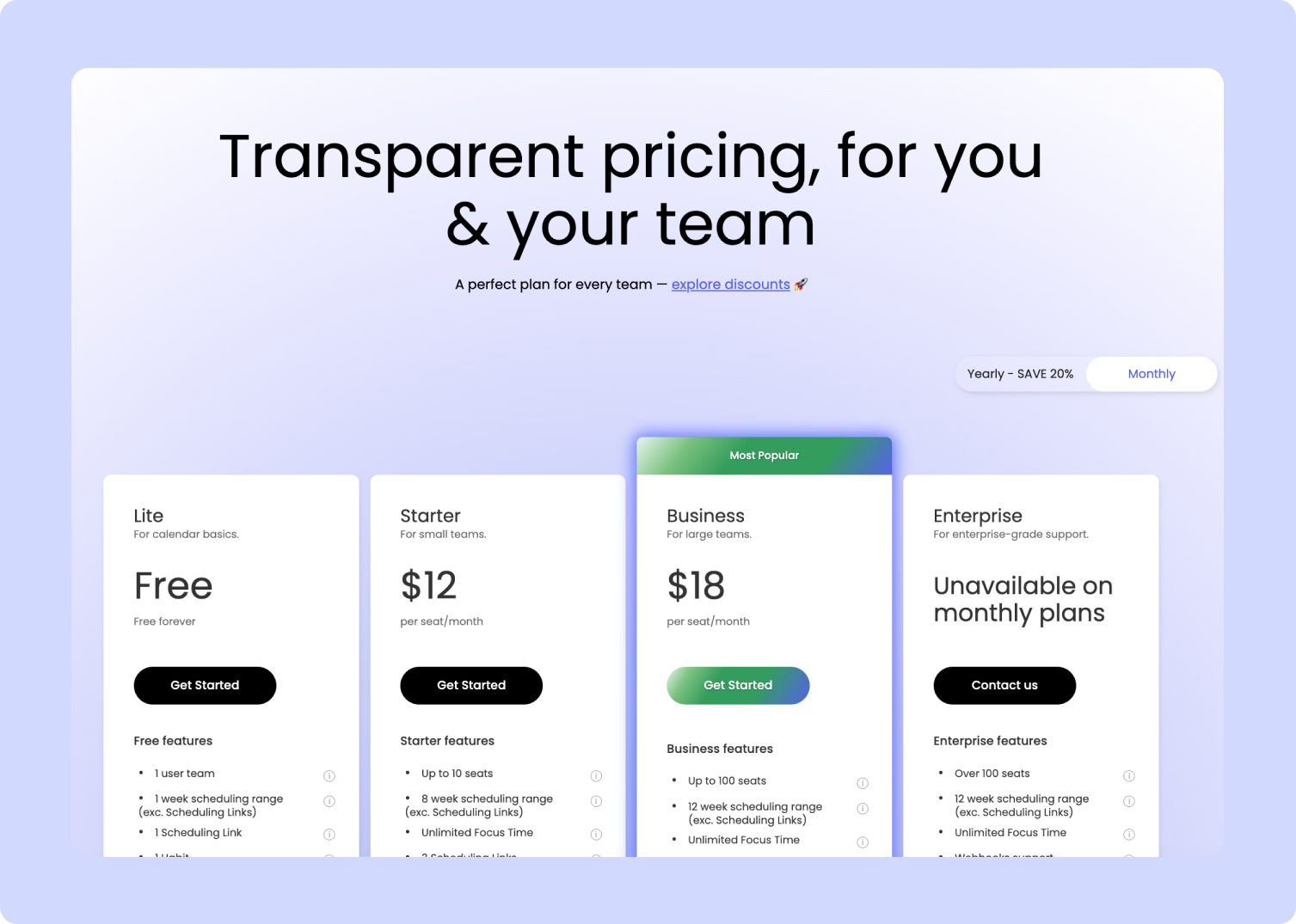
Price is one of the more meaningful differences between these two tools, not just in absolute cost, but in how they charge. Voiset prices per workspace with user limits per plan; Reclaim prices per seat with no team size cap per tier. For small teams, understanding both structures is important before committing.
Voiset pricing plans
Base plan: AI Tasks are limited (not Unlimited like Advanced/Premium). Voice input capped at just 30 min/mo - freelancers who rely on voice will likely need Advanced. The booking system is only available from the Advanced plan upward.
Reclaim.ai pricing plans
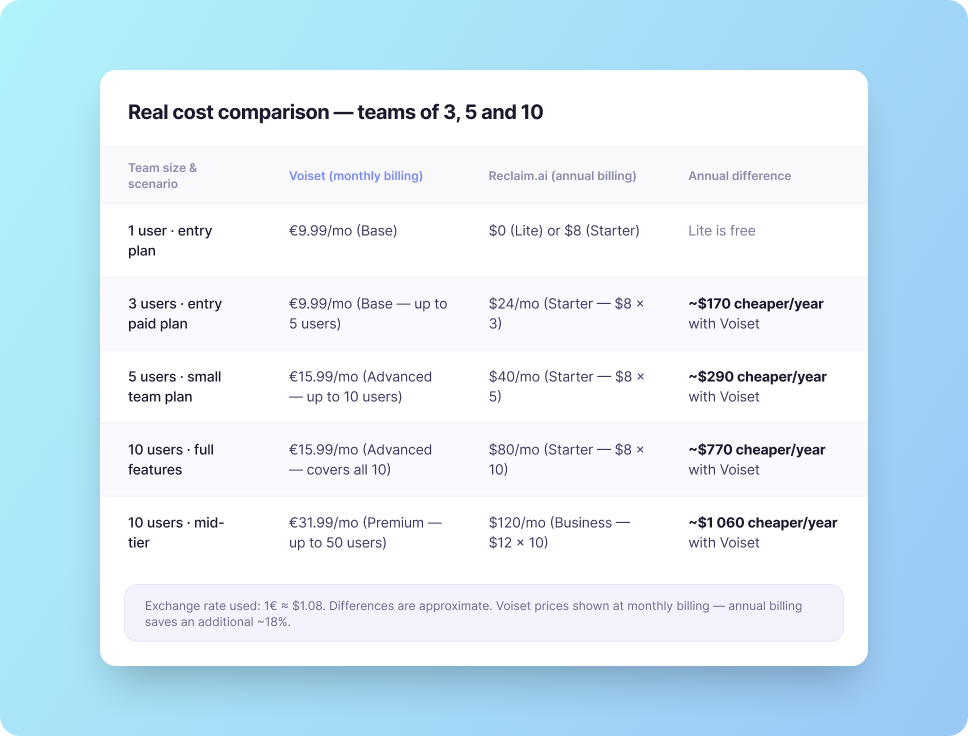
Pricing verdict: which offers more value for small teams?
Both tools have limits; they're just structured differently. Voiset caps by users and workspaces per plan, which means a team of 10 pays one flat workspace price. Reclaim charges per seat, so every person added increases the monthly bill directly.
For teams of 3 to 10 people, Voiset is substantially more affordable; the gap ranges from ~$170 to over $1 000 per year, depending on plan. The Advanced plan at €15.99/month covers up to 10 users with unlimited AI tasks, a booking system, and 120 minutes of voice input, which is the plan most small business teams will actually need.
Worth noting: Voiset's Base plan is more limited than it first appears. AI Tasks are not unlimited, voice input is capped at 30 minutes per month, and there's no booking system. Teams that rely on voice capture or scheduling links will need Advanced from day one.
Real-World Use Cases: Who Wins Where?
Feature lists tell you what a tool can do. Use cases tell you whether it fits the way you actually work. Here's how Voiset and Reclaim.ai perform across three B2B segments where the differences between them matter most.
Freelancers & Solopreneurs
The scenario: A freelance consultant manages 4–6 active client projects simultaneously. She takes calls throughout the day, moves between locations, and has no dedicated admin time. Tasks surface constantly — during calls, between meetings, while commuting. The challenge isn't knowing what to do. It's capturing everything before it gets lost, and having it scheduled without spending an hour reorganising a task list every morning.
How Voiset handles this
How Reclaim.ai handles this
Between client calls, she opens Voiset on her phone and records:
"Send revised proposal to Hartmann by Thursday, high priority."
The app creates the task immediately, title, deadline, priority extracted automatically. No typing, no screen navigation.
That evening, Voiset has already slotted the task into Wednesday afternoon, the only available focus block before the deadline. She didn't plan her day. The AI did it around her existing meetings. The Advanced plan at
€15.99/month
covers everything she needs: unlimited tasks, 120 minutes of voice input, and a booking link for client scheduling.
⚡ Relevant features: voice-to-task on mobile · AI autoplanning · booking links · ChatGPT plugin for planning sessions
Reclaim's free Lite plan works reasonably well for solo use, Focus Time blocks protect her deep work slots, and scheduling links handle client meeting requests. Where it falls short:
there's no mobile app,
so capturing tasks between calls means pulling out a laptop or forgetting them entirely.
To unlock full PM integrations or more than 3 habits, she'd need the Starter plan at
$8/month per seat.
At that price point, Reclaim becomes comparable in cost to Voiset, but without voice capture, without a native app, and with a steeper initial setup for someone who just needs to stay organised across multiple clients.
⚠ Key gap: no voice input · no native mobile app · Lite plan
Voiset wins
For freelancers who work away from a desk and need to capture tasks quickly, voice input and a native mobile app are not optional features — they're the primary interface. Reclaim's strength is calendar defense, which matters less when your main problem is task capture and juggling multiple clients on a tight budget.
Business Teams (2–15 people)
The scenario: A boutique marketing agency has 8 people: a founder, two account managers, three content producers, a designer, and a part-time project coordinator. They run 10–15 active client campaigns at any time. Work is distributed across team members, deadlines shift frequently, and the biggest recurring pain is that tasks fall through the cracks between verbal instructions and actual calendar time.
How Voiset handles this
How Reclaim.ai handles this
The founder uses voice input to delegate:
"Set up a task for Mira, first draft of the Nexus campaign copy, due next Monday, urgent."
The task appears in the shared workspace, assigned and scheduled automatically around Mira's existing calendar commitments. No Slack back-and-forth. No forgotten follow-ups.
The entire 8-person team runs on one Advanced plan —
€15.99/month total,
not €15.99 per person. Each team member has their own workload view; the founder has a master calendar showing all workspaces together. When a deadline moves, Voiset reschedules affected tasks across the team without a manual reorganisation meeting.
⚡ Key advantage: 8 users on one flat plan · shared workspaces · voice delegation · AI rescheduling across team
Reclaim's team features focus on schedule coordination — Smart Meetings finds the best time for team syncs across everyone's calendar, and team analytics show where time is being spent. If this agency runs on Asana or ClickUp, Reclaim can pull those tasks into individual calendars automatically.
The cost gap is significant:
8 users on Reclaim Starter = $64/month. 8 users on Reclaim Business = $96/month.
Against Voiset Advanced at €15.99 for the whole team, the agency would pay 4–6× more for Reclaim — for a tool that doesn't support voice input or native mobile access for the team members who are often out of the office.
⚠ Key gap: per-seat pricing adds up fast · no shared task workspaces · no voice delegation · no native mobile app
Voiset wins
For a team of 8 running on a tight budget, the flat-plan pricing alone makes Voiset the practical choice. Add voice delegation, shared workspaces, and AI rescheduling — and Reclaim's per-seat model can't compete at this scale.
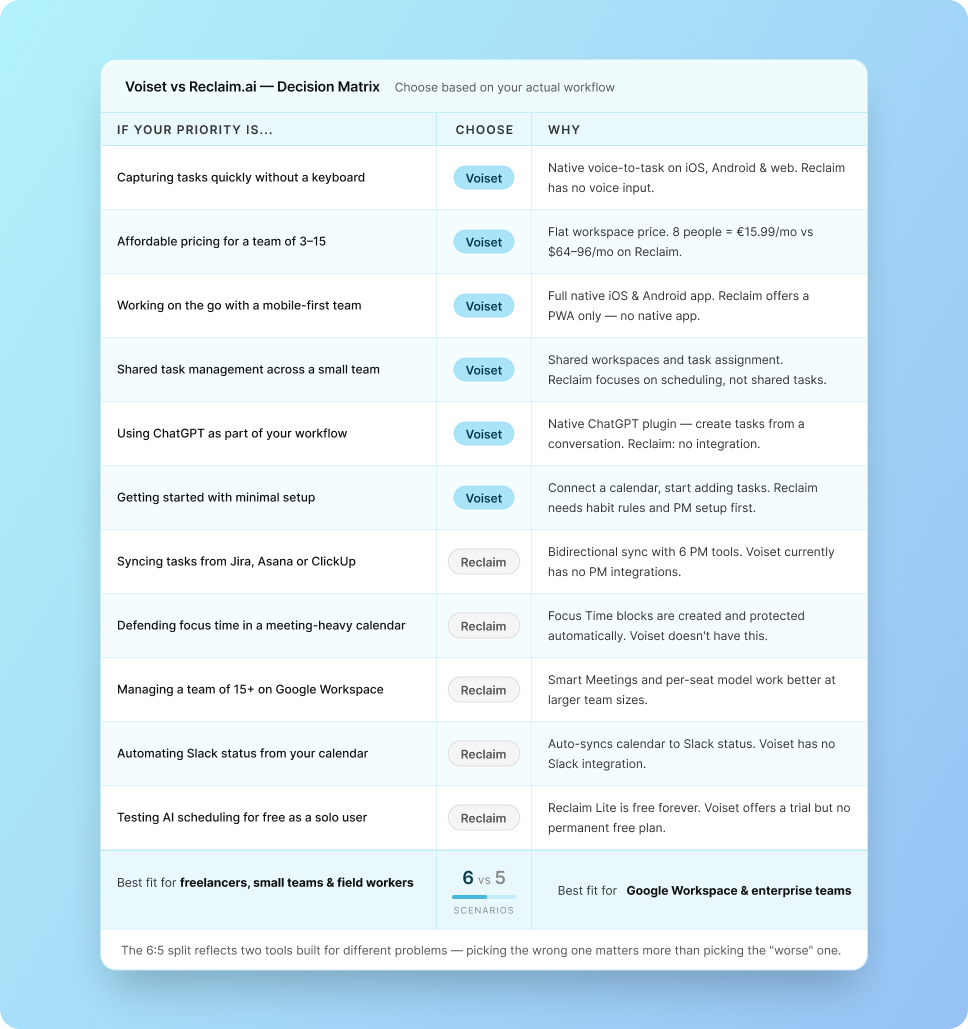
Voiset vs Reclaim.ai: Decision Matrix
Not sure which one fits your situation? Use this table to get a direct answer based on what actually matters in your workflow.
Tally: Voiset wins 6 out of 11 scenarios · Reclaim wins 5 out of 11 · The split reflects two genuinely different tools; choosing the wrong one for your workflow is a bigger problem than choosing the "worse" one.
Final Verdict: Voiset vs Reclaim.ai
Before comparing numbers, one practical difference worth noting: Voiset offers a 14-day free trial on all paid plans.
For any tool you're considering paying for monthly, a trial isn't a bonus -it's a baseline. Two weeks is enough to run a real project through the system, test voice input with your actual tasks, and see whether AI scheduling fits the way your team works.
For most businesses, freelancers, and field teams, that context doesn't apply. The absence of a native mobile app and voice input isn't a minor gap, it's a fundamental mismatch with how these users actually work. They're away from desks, capturing tasks between calls, delegating verbally, and needing a planner that follows them rather than requiring them to sit down and configure it.
Voiset is built for that reality. Voice-to-task input, a native mobile app, flat workspace pricing, and shared task management across small teams, these aren't differentiating extras. They're the foundation of the product. For a team of 2 to 15 people that doesn't run on Jira or need Slack status sync, Voiset offers more practical value at a lower total cost.
FAQ
Is Voiset free to use?
Voiset does not have a permanent free plan, but all paid plans come with a free trial - no credit card required to get started. The trial gives you full access to the plan's features so you can evaluate the tool before committing.
Paid plans start at €9.99/month (Base, monthly billing) and cover up to 5 users and 3 workspaces. The Advanced plan at €15.99/month (or €13/month on annual billing) covers up to 10 users with unlimited AI tasks, voice input up to 120 minutes per month, and a booking system, which is the plan most small business teams will need from day one.
Does Reclaim.ai have voice input?
No. Reclaim.ai does not have voice input on any plan. Tasks can only be entered manually through the Reclaim interface, or imported automatically from a connected project management tool like Asana, Jira, or ClickUp.
This is one of the clearest functional differences between Reclaim and Voiset. Voiset supports voice-to-task input across iOS, Android, and web, you describe a task out loud, and the AI extracts the title, deadline, and priority automatically. For users who need to capture tasks away from a keyboard, between calls, on a commute, or in the field, this gap is significant.
Which AI task manager is better for freelancers?
For most freelancers, Voiset is the better fit. The core reasons: voice-to-task input on mobile means you can capture new work between client calls without stopping to type, AI autoplanning schedules tasks around your existing calendar automatically, and the Advanced plan at €15.99/month covers a solo professional's full workflow, including unlimited tasks, voice input, and booking links for client scheduling.
Reclaim's free Lite plan can work for solo use, it offers Focus Time blocking and basic scheduling links at no cost. But it lacks a native mobile app and voice input, which matters if you work on the go. The moment you need more than 3 habits or full PM integrations, you're on a paid Starter plan at $8/month - at which point Voiset offers more practical features for a comparable price.
The key structural difference: Voiset charges per workspace with a user cap per plan, while Reclaim charges per seat. For small teams, this means Voiset is significantly cheaper.
A team of 5 on Voiset Advanced pays €15.99/month total. The same team on Reclaim Starter pays $40/month ($8 × 5 users), roughly 2.5× more. At 10 users, Voiset Advanced remains €15.99/month while Reclaim Starter scales to $80/month.
The exception is solo users: Reclaim's free Lite plan costs nothing, while Voiset's entry plan starts at €9.99/month. If you're evaluating as a single user and budget is the primary concern, Reclaim Lite is a reasonable starting point.
Does Voiset integrate with Google Calendar?
Yes. Voiset integrates with Google Calendar on all paid plans. Your existing Google Calendar events are pulled into Voiset's workspaces, so meetings, appointments, and personal events appear alongside your task list in a single unified view. The AI scheduler uses these events to find available time slots and plan your tasks around them automatically.
In addition to Google Calendar, Voiset also integrates with Microsoft Outlook and Zoom. Notifications and reminders can also be delivered via the Telegram bot if your team uses Telegram for communication.
If you're managing both work and family commitments in the same calendar, the integration works just as well for personal scheduling. We've covered how to set this up in detail - see how to create a family schedule in Google Calendar.
What Voiset does not currently offer is deep integration with project management tools like Jira, Asana, or ClickUp. If your tasks live in one of those systems and you need bidirectional calendar sync, Reclaim.ai handles that use case better. But Voiset has MCP integration with Claude.



.webp)
.webp)
.webp)
.webp)
.webp)

