


.webp)
You don't fall behind because you're lazy. You fall behind because the day fights you. Tasks pile up in your inbox. Reminders hide in chat. Your calendar says you're free at 2 p.m., then quietly books two meetings on top of each other.
Here is one number that explains a lot. A study by Gloria Mark at the University of California, Irvine found that after a single interruption, it takes more than 23 minutes to get back into a task. Have a few of those before lunch and the morning is already gone. Not to the work, but to the jumping between it.
Optimizing your schedule is not about doing more. It is about taking that fight out of the day: getting everything into one place, letting scheduling software handle the planning, and protecting the hours that matter.
Below are six simple steps to do it. First the method, then the tool that does each step for you. We use Voiset as the example, but the ideas work with any setup.
What schedule optimization actually means
Schedule optimization means putting the right task at the right time, with no clashes and no wasted gaps. By hand, it is slow and a little boring. With the right software, it is almost automatic.
Scheduling software is a tool that helps you collect your tasks, drop them into time blocks, and keep one calendar that never double-books. AI scheduling tools go a step further. They look at what matters most to you, your deadlines, and what is already booked, then build the day for you. When something changes, they move things around so you don't have to. That is the difference between a calendar that just holds your plans and one that actually makes them.
.webp)
Step 1. Get every task out of your head and into one place
There is a reason a half-finished task keeps poking at you while you try to focus on something else. In the 1920s, a psychologist named Bluma Zeigarnik noticed that waiters could remember complex orders perfectly, right up until the food was served. The second the order was done, they forgot it. Open tasks stay in your head and quietly eat your attention. Finished ones let go.
So the first step is simple. Stop keeping tasks in your head, and stop spreading them across sticky notes, three apps, and your inbox. Put them in one place, the moment they show up.
The fastest way to do that is your voice. Say it out loud and let the app write it down. With Voiset you can speak a task or a quick note and it lands in your list in a second. No typing, no app-switching. Got an idea in the car or between two meetings? Say it now, sort it later. Smart Notes keeps those loose thoughts and, when you are ready, turns them into real tasks with a time and a date.
Do this for a week and you will feel it. Your head goes quiet, because it is no longer trying to be your to-do list.
.webp)
Step 2. Let the software plan your day, not you
In 1955, a British writer named Cyril Northcote Parkinson made a joke that turned out to be true. He said work expands to fill the time you give it. Give a report all week and it takes all week. Give it Tuesday afternoon and, somehow, it gets done by Tuesday evening. The lesson is simple. Open time gets eaten. Time with a clear block around it gets used.
This is where most people lose the day. They keep a long to-do list with no times on it, then spend the morning deciding what to do first. That choosing is not free. Every small decision drains a little focus, and by noon you are tired before the real work even starts.
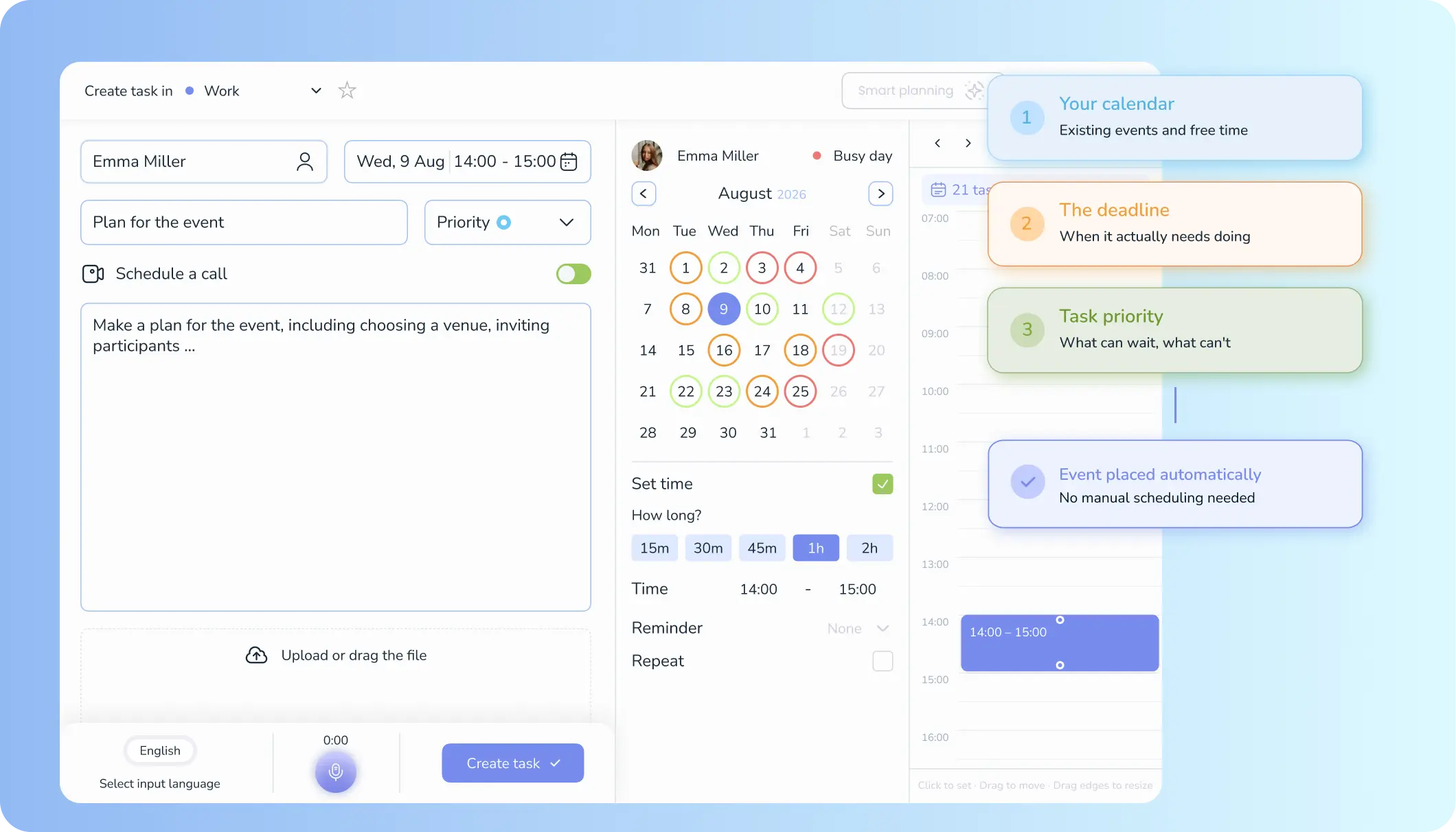
So hand the planning to the software. With one tap, Voiset reads three things: what is already on your calendar, when each task is due, and how important it is. Then it builds your day for you, task by task, with a time block on each one. No blank list to stare at. No "what now?" every twenty minutes.
The best part is what happens when life changes. A meeting runs long, a new job jumps the queue, and the plan still holds. The AI shifts the rest of the day to fit, so you are never rebuilding your schedule by hand.
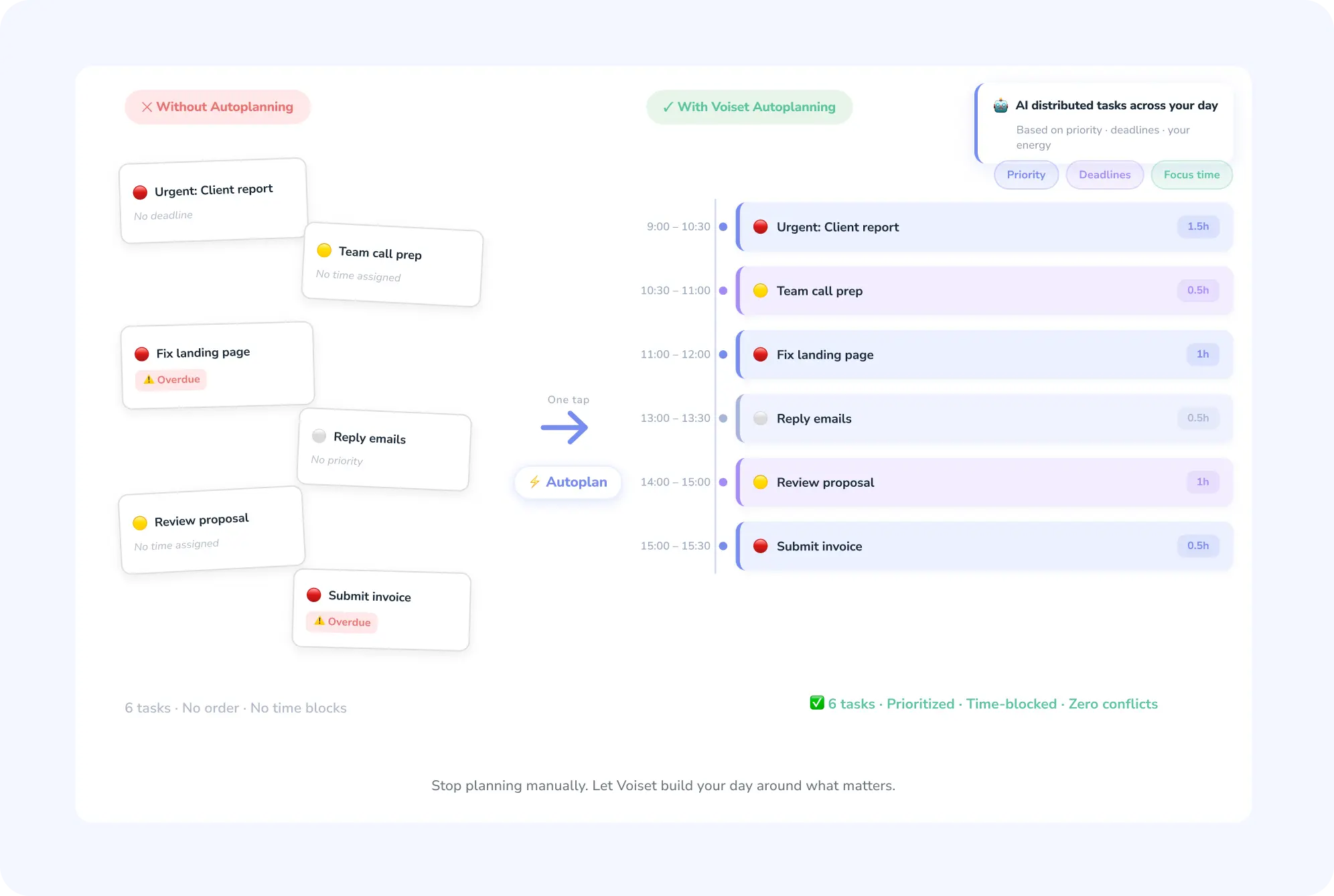
Step 3. Keep one calendar that never double-books
Most of us do not have one schedule. We have four. There is the work calendar, the personal one, the to-do app, and the meeting that lives only in a chat thread. Each looks fine on its own. Together they quietly book you in two places at once.
And every clash costs more than the clash itself. A team at the American Psychological Association found that flipping between tasks can eat up to 40 percent of your productive time. So a double-booked hour does not just steal that hour. It steals the focus on both sides of it, while you stop to work out what goes where.
The fix is to put everything in one view. Voiset pulls your Google and Outlook calendars, your tasks, and your meetings into a single smart calendar, then color-codes the load so you can read your week in one glance. A day that is too full looks too full. A day with room shows it.
When you add or move something, the app checks the slot first and tells you right away if it is free or already taken. Need to shift a task? Drag it to a new time and Voiset confirms there is no clash before it lands. No more "wait, did I promise two people the same Tuesday."
.webp)
Step 4. Plan straight from your AI assistant
Here is a small truth about productivity tools. The harder a thing is to open, the less you use it. If adding a task means unlocking your phone, finding the app, waiting for it to load, and tapping through three screens, you will just not do it. The thought stays in your head, and we already know what that costs you.
So the best place to plan is wherever you already are. For a lot of people now, that is a chat with an AI assistant.
Voiset connects to Claude through something called MCP, a standard that lets an AI assistant talk to other apps in a safe, direct way. Once it is linked, you can plan your day in plain words, right inside the chat. Ask "what is my next free two-hour block this week?" and Claude reads your real Voiset calendar and answers with an open slot. Say "yes, block it for deep work" and the task lands in your schedule. No app to open. No menus to tap.
It works the other way too. You can create tasks, move deadlines, and check your week without ever leaving the conversation. Your assistant becomes your planner, and your planner stays up to date on its own. If you want to set it up, here is the guide to connect Voiset to Claude.
.webp)
Step 5. Let people book you without the back-and-forth
You know this dance. "Does Tuesday work?" "Tuesday is full, how about Thursday?" "Thursday morning or afternoon?" "Afternoon, but not after three." Five emails later, you have booked one thirty-minute call. Studies of office work put the average back-and-forth to agree on a single meeting at around eight messages. That is eight little interruptions for one slot.
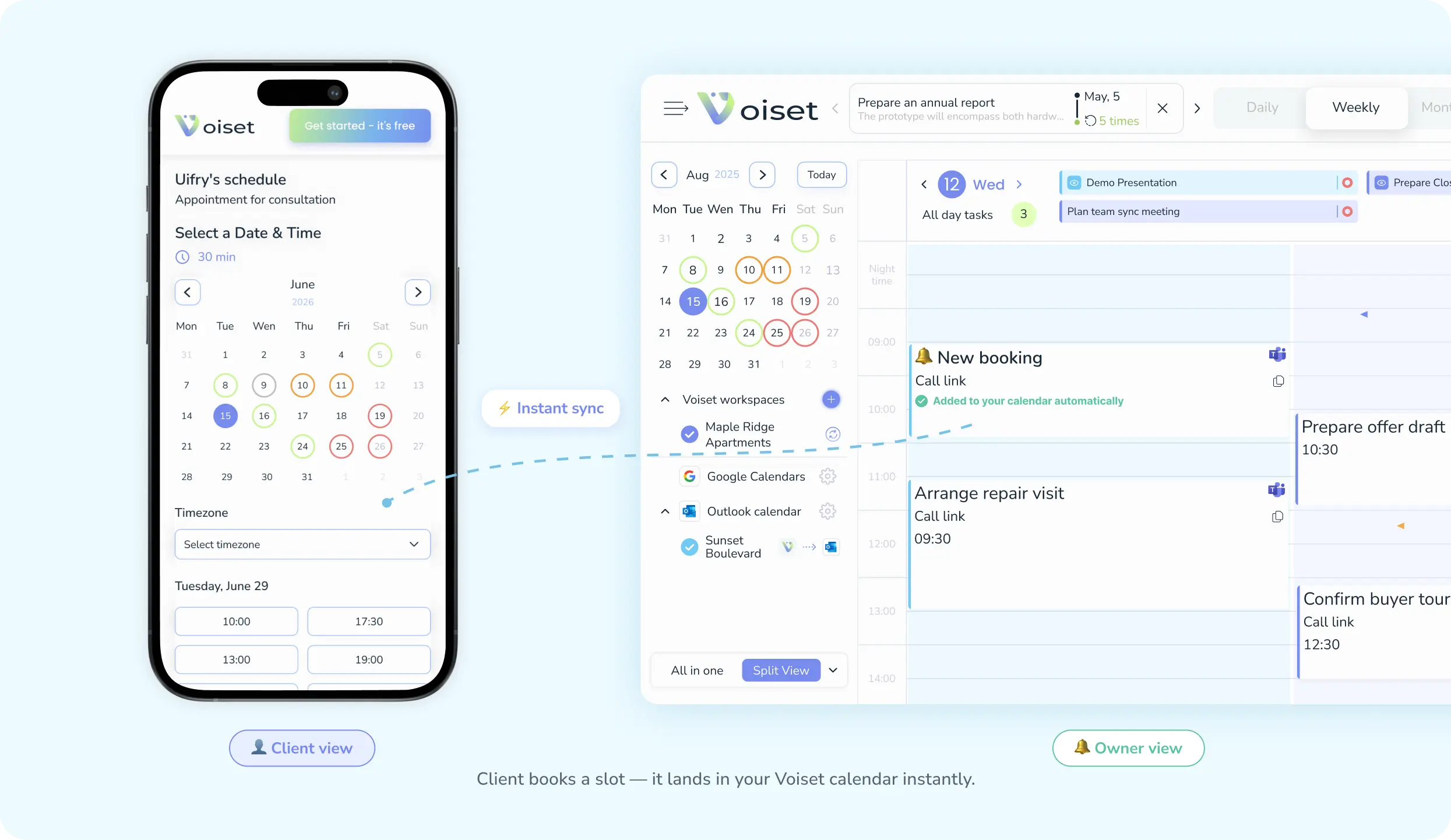
A booking link kills the whole thread. You share one link, the other person sees only the times you are actually free, and they pick one. Done. No messages, no guessing, no double-booking.
Voiset gives you a booking page that reads your real calendar, so it only ever offers open slots. The person picks a time in their own time zone, and the moment they confirm, the meeting drops straight into your Voiset calendar. You do not lift a finger. One side books, the other side just sees it appear.
And it is on every plan, including the free one, so a simple way to stop trading emails is not locked behind a paywall.
Step 6. Spend five minutes reviewing your week
The first five steps build the system. This one keeps it honest. Once a week, open your calendar and just look. What got done, what kept sliding to tomorrow, where the week felt too tight. You are not grading yourself. You are giving the plan a quick check so it fits the real you, not the ideal one.
Remember those unfinished tasks from Step 1, the ones that sit in your head and pull at your attention? A weekly review is how you close that loop on purpose. You see the loose ends, deal with them or reschedule them, and your mind gets to let go for real.
Voiset makes this part easy, because everything already lives in one place. Tasks you added by voice, blocks the AI planned, meetings clients booked, deadlines from across your calendars, it is all on one screen. You can also pull simple stats on where your time actually went, which is often a surprise. Most people guess wrong about their own week until they see it laid out.
Then you adjust. Move a recurring task to a calmer day. Give yourself more focus time. Drop the thing you keep avoiding because it never really mattered. Small tweaks, once a week, are what turn a good setup into a schedule that genuinely runs itself.
What to look for in scheduling software
The market is crowded. There are hundreds of tools out there, free and paid, and most of them fall into one of three families.
First, calendars. Google Calendar, Outlook, and the rest. They are great at showing what is already booked, but they will not plan anything for you. A calendar holds the day. It does not build it.
Second, task managers. Long, tidy lists of everything you have to do. Useful, until the list grows so long that the list itself becomes the stressful part, and you still have to decide when each thing actually happens.
Third, planners. These try to turn tasks into a real schedule. This is the family that saves you the most time, and also the one most people are missing.
The catch is that most tools do one job well and leave you stitching the other two together by hand. You end up copying tasks into your calendar, checking three apps for clashes, and doing the planning yourself anyway. So when you compare options, look for a tool that covers all three, and check it against a few simple questions:
- How fast can you add a task? If it takes more than a few seconds, you will stop doing it. Voice input is the quickest way in.
- Does it plan for you, or just store your plans? The real time-saver is software that builds the day automatically from your priorities and deadlines.
- Does it keep one conflict-free view? It should pull your existing calendars together and warn you before you double-book, not after.
- Does it fit where you already work? Bonus points if you can plan from your phone by voice or straight from an AI assistant like Claude.
- What do you get for free? Plenty of tools lock the basics behind a paywall. Check the free plan before you pay.
This is the gap Voiset was built to close. Instead of a calendar, a task app, and a planner in three browser tabs, it puts all three in one place: capture by voice, let the AI plan and reschedule, and keep a single calendar that never clashes. If you want to try the paid features, there is a 14-day free trial.

