


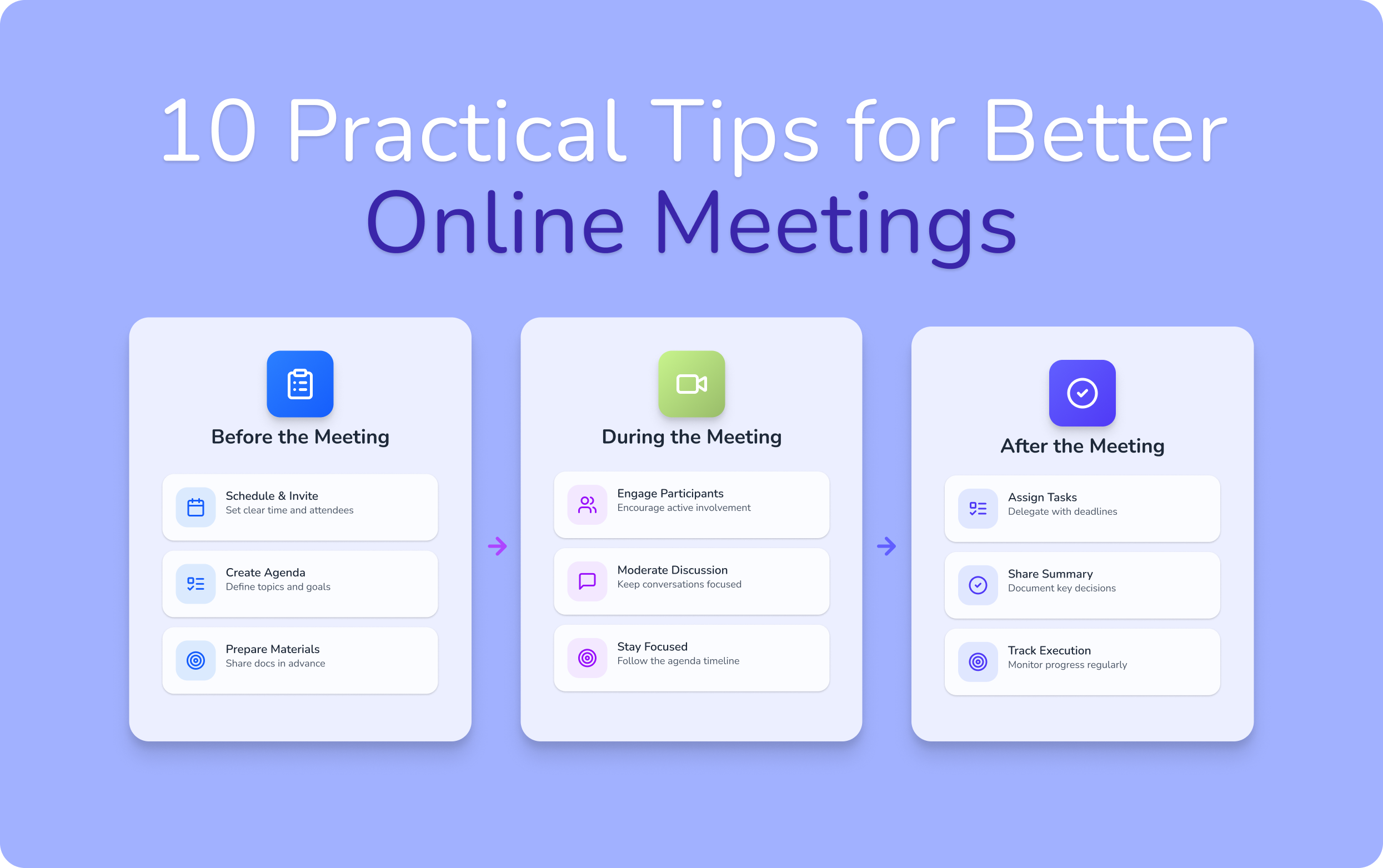
What Makes a Virtual Meeting Effective?
Virtual meetings are part of everyday work now. Teams plan projects, align on decisions, and solve problems through calls instead of conference rooms.
But let’s be honest — not every meeting actually moves work forward.
Most teams have experienced the same situation: a meeting is scheduled for an hour, several people join, the discussion jumps between topics… and when the call ends, everyone quietly asks themselves:
“So… what exactly did we decide?”
That’s the difference between a regular meeting and an effective virtual meeting.
An effective online meeting doesn’t just fill time on the calendar. It creates clarity. People understand the goal of the conversation, decisions are made faster, and everyone leaves knowing what happens next.
At Voiset, we’ve seen this challenge inside our own team meetings too. Early on, some discussions would stretch longer than planned simply because the goal wasn’t defined clearly at the start. Once we started structuring meetings better — setting a clear purpose, keeping discussions focused, and capturing action items immediately — the same conversations became significantly shorter and more productive.
In other words, the difference between frustrating meetings and effective virtual meetings usually comes down to three things:
- a clear purpose for the meeting
- focused discussion during the call
- defined next steps after the meeting
Professional behavior also plays a role in making discussions productive. If you want to understand the behavioral side of online meetings — like communication rules and common etiquette mistakes — you can read our complete guide to virtual meeting etiquette.
But before we dive into best practices, there’s one common problem that almost everyone recognizes immediately…
The “This Could Have Been an Email” Meeting Problem
Almost everyone has experienced this moment.
You join a meeting.
Ten people are on the call.
The meeting is scheduled for an hour.
Within the first few minutes, the thought appears:
“This could have been an email.”
Or even worse — it could have been a two-minute message in the team chat.
The meeting starts slowly. Someone says, “Let’s wait a few minutes for others to join.”
Five minutes pass before the real discussion begins.
Then the conversation drifts.
Someone shares an update that wasn’t really necessary.
A question turns into a long side discussion.
Another participant repeats information that was already shared in Slack earlier that day.
And suddenly, the meeting that was supposed to last 30 minutes stretches into an hour.
This is one of the biggest frustrations people have with online collaboration today.
Meetings aren’t exhausting because they exist — they’re exhausting because many of them lack purpose and structure.
Without a clear agenda, moderation, and defined outcomes, discussions easily drift. Instead of helping teams move forward, meetings become interruptions in the workday.
That’s why learning how to run effective virtual meetings has become such an important skill for modern teams.
When meetings are designed properly, something interesting happens:
- discussions stay focused
- participants stay engaged
- decisions happen faster
- and teams spend less time on unnecessary calls
In other words, effective online meetings don’t just save time — they make collaboration smoother and more productive.
The sections below will walk through practical strategies teams can use to turn long, unfocused calls into meetings that actually move work forward.
Before the Meeting: Preparation Tips for Effective Virtual Meetings
.webp)
Many people try to fix meetings during the call.
But most problems actually start before the meeting even begins.
When there’s no preparation, meetings drift. Conversations jump between topics, people repeat the same points, and the call ends without a clear decision. That’s why many effective virtual meetings are built on simple preparation.
If you look at the most reliable virtual meeting best practices, they almost always start with the same principle: clarity before the call.
Good preparation helps everyone understand why the meeting exists and what needs to happen during the discussion. It also prevents the classic “we could have solved this in chat” situation.
These small preparation steps are some of the most useful tips for running a virtual meeting that actually leads to results.
Let’s start with the most important one.
Define the Meeting Goal
Before scheduling a meeting, ask a simple question:
What should change after this meeting ends?
If the answer is unclear, the meeting probably shouldn’t exist yet.
One of the biggest mistakes teams make is scheduling calls without defining the outcome. The invite simply says something like “Sync” or “Quick discussion.” When the meeting starts, participants are unsure what they’re supposed to solve.
At Voiset, we’ve learned that meetings become dramatically more productive when the goal is stated upfront. Instead of vague titles, the meeting description might say something like:
- Decide which feature goes into the next release
- Review product feedback from the last sprint
- Align on marketing priorities for the week
This simple step turns a random discussion into an effective virtual meeting.
A clear goal also helps participants prepare. People bring the right information, the discussion stays focused, and decisions happen faster.
If the goal is still unclear, sometimes the best move is to avoid the meeting altogether. A quick message in Slack or a shared document might solve the issue without blocking everyone’s calendars.
In the end, defining the goal is one of the most practical tips for running a virtual meeting — and one of the easiest ways to turn ordinary calls into effective online meetings that actually move work forward.
Create a Clear Agenda
Once the meeting goal is defined, the next step is simple — create a clear agenda.
This might sound obvious, but many virtual meetings still begin with a vague question like:
“So… what should we start with?”
Without an agenda, discussions easily drift. One question leads to another, someone introduces a new topic, and before you realize it, half the meeting is gone — but the main issue hasn’t even been addressed yet.
One of the most important virtual meeting best practices is giving participants a simple structure to follow. A short agenda helps everyone understand what will be discussed and how the time will be used.
A good agenda doesn’t have to be complicated. In most effective virtual meetings, it can be as simple as three points:
- the main topic to discuss
- the key decisions that need to be made
- the time allocated for each discussion
For example, instead of scheduling a generic meeting called “Project update,” the agenda might look like this:
- Review current project status (10 min)
- Discuss client feedback (10 min)
- Decide next development priorities (10 min)
This structure helps participants stay focused and prevents the conversation from wandering into unrelated topics.
At Voiset, we often pair agendas with structured meeting notes so important points don’t get lost during discussion. Tools like smart meeting notes make it easier to capture ideas, decisions, and follow-up tasks in real time, which helps keep conversations organized.
In short, agendas are not about formality — they’re about clarity. When participants know what will happen during the call, meetings become shorter, discussions stay focused, and teams can turn conversations into decisions much faster.
Invite the Right Participants
One of the simplest ways to make meetings more productive is also one of the most overlooked: invite only the people who truly need to be there.
Many effective virtual meetings work better with a smaller group of participants who are directly involved in the decision or task being discussed.
Before sending the invite, it helps to ask a few quick questions:
• Who needs to make the decision?
• Who has the information required for the discussion?
• Who actually needs to hear the outcome?
This approach is especially useful for independent professionals and small teams who manage multiple responsibilities at once. For example, many people using an AI personal planner rely on structured schedules to protect their focus and avoid unnecessary meetings.
In the end, inviting the right participants isn’t about excluding people — it’s about respecting everyone’s time and keeping discussions focused.
Prepare the Technology
Even the best agenda won’t help if the meeting starts with technical problems.
Most people have experienced the classic beginning of an online meeting:
“Can you hear me?”
“Your microphone is muted.”
“Wait, my screen isn’t sharing.”
A few minutes of technical confusion might seem harmless, but repeated interruptions quickly break the flow of discussion and reduce engagement.
That’s why one of the most practical tips for running a virtual meeting is simply testing the technology beforehand.
Before the call starts, it helps to check:
- your microphone and audio quality
- your camera position and lighting
- screen sharing permissions
- internet stability
These small steps prevent distractions and help meetings start smoothly.
When technology works quietly in the background — instead of interrupting the meeting — discussions become smoother, more focused, and significantly more productive.
During the Meeting: How to Keep Virtual Meetings Productive
Even with good preparation, a meeting can quickly lose focus once the discussion begins. The way the conversation is managed during the call plays a big role in running effective virtual meetings.
A few simple practices can help keep discussions structured and ensure the meeting stays productive from start to finish.
Start With Clear Expectations
At the beginning of the meeting, briefly restate the purpose and what the team hopes to achieve.
For example: “The goal of this meeting is to decide the next product priorities for this week.”
This helps align everyone immediately and sets the tone for an effective virtual meeting. When participants understand the objective, discussions are more focused and decisions happen faster.
Assign a Moderator
One of the easiest ways to improve meetings is to assign a moderator.
The moderator’s role is to guide the discussion, keep the conversation on track, and ensure that everyone has the opportunity to contribute. Without this role, conversations can easily drift into unrelated topics.
A moderator helps maintain structure and is often key to running effective virtual meetings.
Encourage Participation and Focus
Productive meetings require engagement from everyone involved.
Encourage participants to share input, ask questions, and contribute ideas. At the same time, avoid multitasking or distractions that reduce attention during the discussion.
Balanced participation helps teams generate better ideas and maintain momentum throughout the call.
Manage Time and Stay on Topic
Meetings often become unproductive when discussions go far beyond the original agenda.
To keep an effective virtual meeting, try allocating an approximate time for each topic and gently redirect the conversation if it starts drifting.
Simple phrases like “Let’s return to the main topic” or “We can follow up on that separately” help keep the meeting focused.
Capture Key Decisions in Real Time
One of the best ways to prevent confusion later is to record important points as they happen.
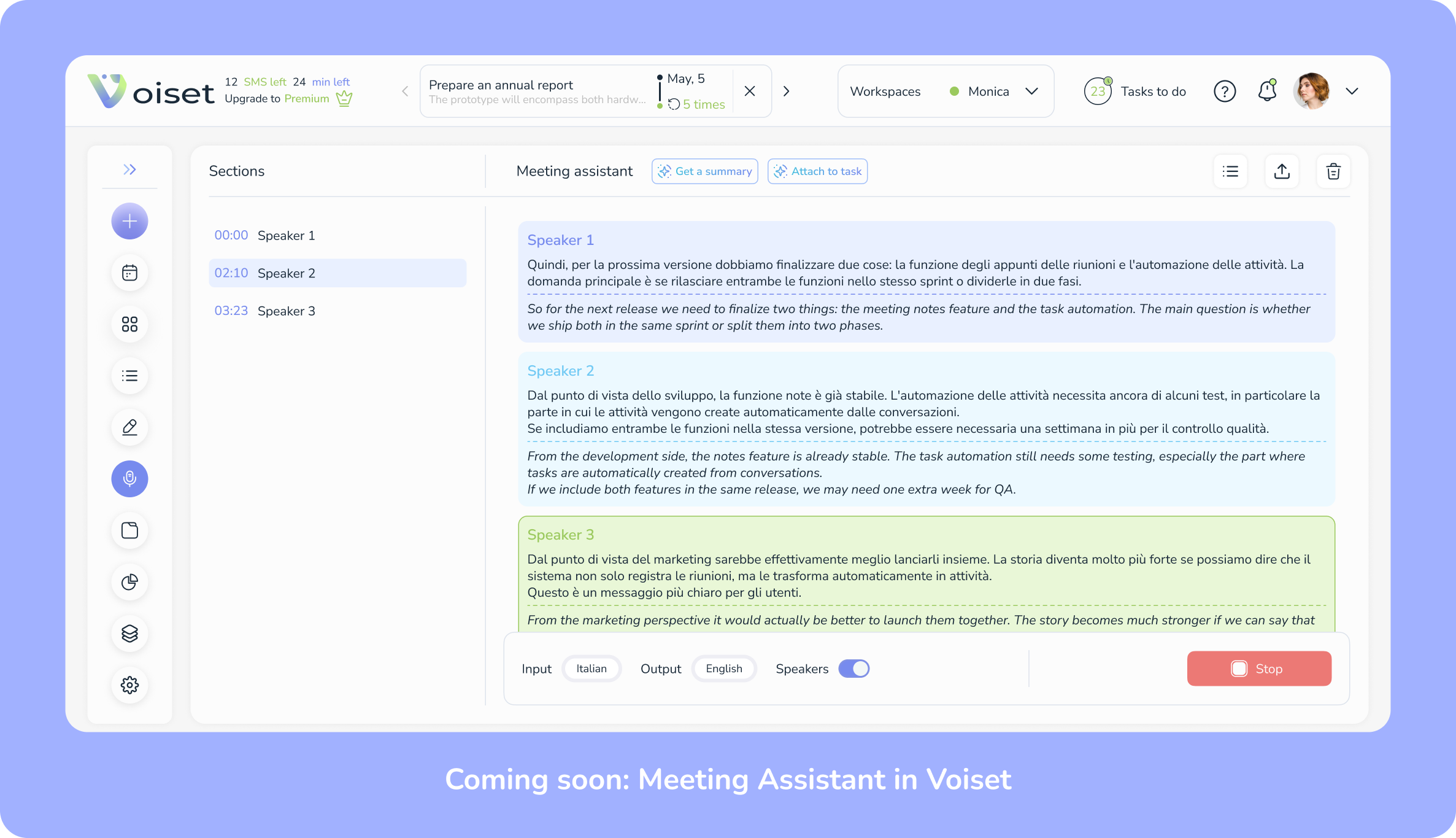
Instead of relying on memory after the meeting, capture decisions and action items during the discussion. Many teams now use tools that automatically convert conversations into structured notes using a voice assistant or AI-powered meeting summaries.
For example, smart meeting notes can help capture key points in real time so that decisions and tasks don’t get lost once the meeting ends.
When key information is recorded during the call, teams can focus on the discussion while the system tracks the outcomes.
After the Meeting: Turn Discussion Into Action
Most meetings don’t fail during the call.
They fail after it ends.
Everyone leaves the meeting thinking the conversation was productive. Ideas were discussed, decisions seemed clear, and the team felt aligned.
But a few hours later, something strange happens.
People start asking:
- “Wait, what exactly did we decide?”
- “Who was supposed to handle that task?”
- “Are we discussing this again next week?”
This is where many teams lose momentum.
Effective meetings don’t end when the call ends — they end when the discussion turns into action. If you want to know how to improve virtual meetings, focus on what happens immediately after the conversation.
The following practices help teams turn discussions into clear decisions and real progress.
Summarize Key Decisions
Before closing the meeting, take a moment to summarize what was actually decided.
Many conversations feel productive during the call, but without a short recap participants may leave with completely different interpretations of the outcome.
A quick decision summary helps prevent confusion.
For example:
Decision recap example
- Launch date moved to June 15
Marketing campaign starts next week - Product team will finalize feature testing
This simple step aligns everyone before the meeting ends.
Assign Action Items
A meeting without action items is just a conversation.
One of the biggest productivity killers in meetings is the phrase:
“Someone should take care of this.”
If no specific person is responsible for the task, it often doesn’t get done.
That’s why effective teams follow a simple rule:
Every action item must have an owner.
A clear task should include three elements:
- the action that needs to be completed
- the person responsible
- the expected outcome
For example:
Instead of saying: “We should update the presentation.”
Write: “Sarah will update the presentation slides before Thursday.”
Clear ownership removes ambiguity and helps teams move forward faster.
Set Deadlines and Follow-Ups
Another common meeting problem is the lack of deadlines.
Teams agree on tasks, but no timeline is attached to them. Days pass, priorities shift, and the topic eventually returns in another meeting.
This is sometimes called the “meeting echo effect” — when the same topic appears again and again because it was never assigned a deadline.
To prevent this, every action item should include a clear timeframe.
Instead of saying:
“Let’s work on this soon.”
Be specific:
- “We’ll review the progress next Tuesday.”
- “The proposal will be ready by Friday.”
Deadlines create accountability and help teams track progress between meetings.
Follow-up meetings should also have a clear purpose. They should review results, not restart the same discussion.
Share Meeting Notes With the Team
The final step is making sure everyone has access to the meeting summary.
Even participants who attended the meeting may forget details after a few hours. Team members who couldn’t attend rely on notes to understand what was decided.
Good meeting notes should be simple and structured.
A useful format often includes:
Meeting Notes Template
- Meeting goal
- Key decisions
- Action items
- Deadlines
- Next meeting date
Sharing notes quickly is important. In many teams, meeting summaries are sent within 10–15 minutes after the call while the discussion is still fresh.
Modern meeting tools can simplify this process by automatically generating structured notes from conversations using a voice assistant. Instead of manually writing summaries, teams can focus on the discussion while the system captures key points in the background.
.webp)
Common Problems That Make Virtual Meetings Ineffective
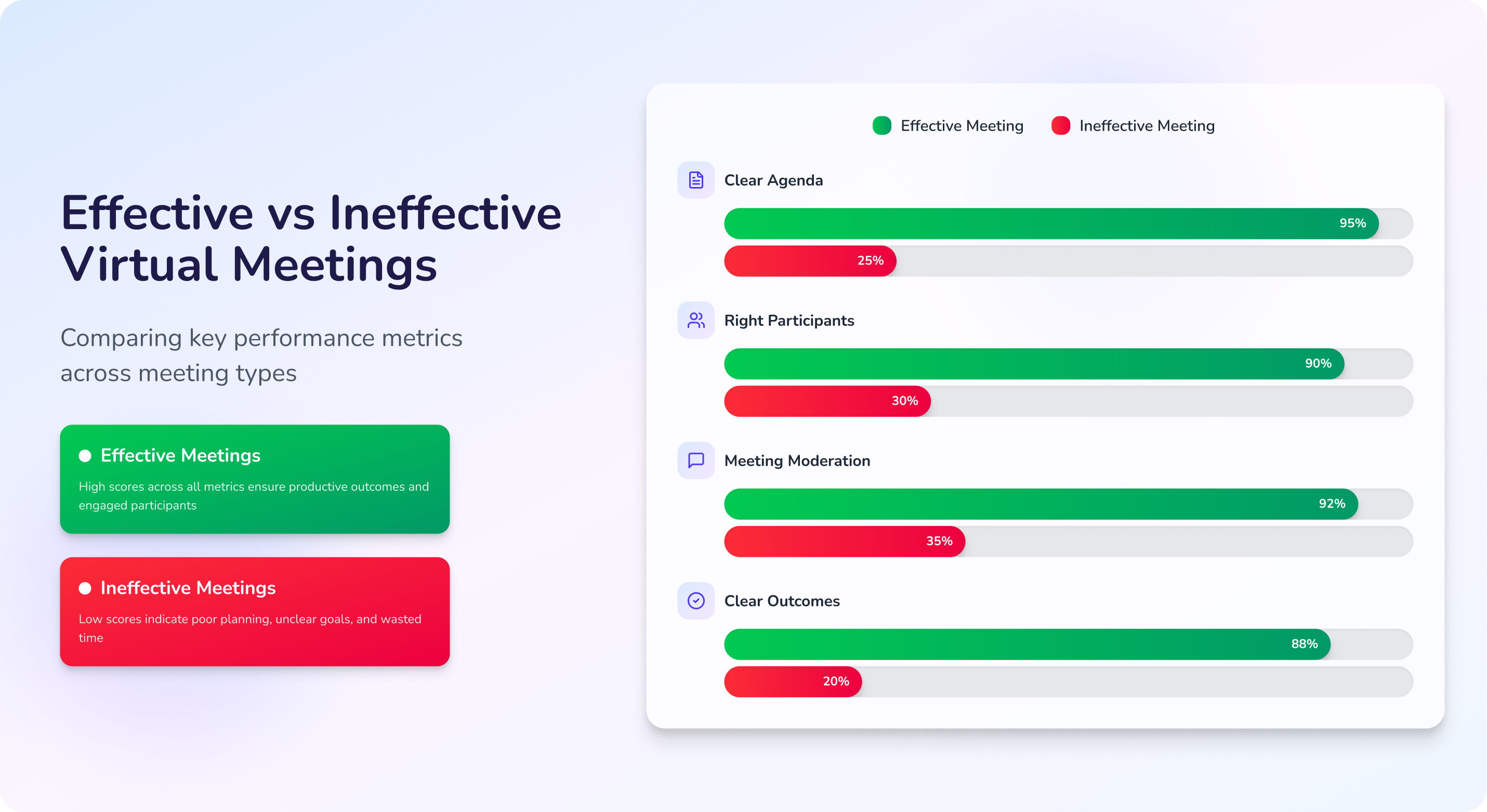
Even well-intentioned meetings can quickly become unproductive if a few basic principles are missing.
If you want to understand how to improve virtual meetings, it often helps to start by identifying what usually goes wrong. The following issues are some of the most common reasons why discussions turn into long, unfocused calls instead of effective virtual meetings.
1. No Agenda
When a meeting begins without an agenda, the conversation usually starts with uncertainty.
Someone asks, “What should we discuss first?” and the discussion immediately becomes reactive. One topic leads to another, and the meeting slowly drifts away from its original purpose.
An agenda doesn’t have to be complex. Even a simple outline of the key topics and expected decisions can help teams run effective online meetings and stay focused throughout the call.
2. Too Many Participants
Inviting too many people to a meeting often makes discussions slower instead of more productive.
Some participants dominate the conversation, while others stay silent. Important decisions become harder because too many perspectives compete for attention.
One of the easiest ways to improve effective virtual meetings is to invite only the people who are directly involved in the decision or task being discussed.
3. Lack of Moderation
Without a moderator, meetings often lose direction.
Discussions drift into unrelated topics, participants interrupt each other, and time runs out before the main issue is resolved.
A moderator helps guide the conversation, keep discussions on track, and ensure that everyone has a chance to contribute. This small role can significantly improve the quality of effective online meetings.
No Clear Outcomes
Perhaps the most common meeting problem happens at the very end.
The call finishes, but no one is sure what was actually decided. Tasks are not assigned, deadlines are unclear, and the same topic appears again in the next meeting.
Effective meetings should always end with clear outcomes: decisions, responsibilities, and next steps. Without them, discussions remain just conversations instead of progress.
Academic research on remote collaboration also highlights specific factors that influence meeting effectiveness. A large-scale survey of more than 3,000 employees studying meeting behavior found that meeting outcomes strongly depend on elements such as having a clear agenda, sharing information before the meeting, and sending a summary afterward.
Virtual Meeting Best Practices Checklist
Running effective virtual meetings doesn’t require complicated systems. Often, it’s the small habits before, during, and after the call that make the biggest difference.
Use this simple checklist to make sure your next meeting stays focused, productive, and easy to follow.
Final Thoughts: Effective Meetings Start With the Right Structure
Most virtual meetings don’t fail because people lack ideas — they fail because the conversation isn’t structured.
Clear goals, a focused agenda, and defined next steps are what turn ordinary calls into effective virtual meetings. When teams prepare before the meeting and capture decisions afterward, discussions become shorter, clearer, and more productive.
Of course, structure is only one part of running effective online meetings. Professional behavior and communication during the call also play an important role.
If you want to learn the professional rules of online meeting behavior, read our full guide to Virtual Meeting Etiquette.
Many people improve their productivity by creating consistent morning routines. In our article 7 Rules of the 5 AM Club, we explain how early habits can help you structure your day and focus on what matters most.

