



How an AI assistant for real estate agents supports real workflows, not desk-based planning
If you ask most real estate agents where their best ideas and next steps appear, the answer is rarely “at my desk.” It’s usually after a showing, in the car, or halfway through a phone call. A client mentions something important in passing. A seller asks for a follow-up tomorrow. A small detail comes up that could influence a deal later.
With over 1.5 million Realtors working in a fast-moving, highly competitive market, those moments add up quickly. And when they’re not captured properly, they’re often lost. Not because agents aren’t organised, but because the tools they’re using don’t match the way the work actually happens.
Real estate is mobile by nature. You’re moving between properties, juggling conversations, and making decisions in real time. Traditional task apps and CRMs expect you to sit down, type things out, and structure information after the fact. In practice, that usually means relying on memory, scattered notes, or messages to yourself – hoping you’ll remember what mattered later.
This is where AI task management starts to make sense. A well-designed AI task manager lets you speak instead of type, turning voice notes to tasks while the context is still fresh. It helps you organise follow-ups, keep track of listings, and stay focused without slowing you down. Tools like Voiset are built around this idea – not to replace your existing systems, but to support real, everyday workflows.
In this guide, we’ll break down how an AI assistant for real estate agents fits into daily work, why AI for real estate agents is becoming increasingly practical, and how voice-driven planning can help you stay on top of details without adding another layer of complexity.
The reality of modern real estate work (and why details slip)
Real estate looks organised from the outside – calendars full of showings, neatly scheduled calls, listings tracked in a CRM. In reality, most agents spend their days reacting to small, fast-moving details that don’t arrive in neat blocks of time.
A viewing runs long. A buyer shares feedback while you’re locking up. A seller asks for an update just as you’re pulling away. Between appointments, there’s often only a few minutes – sometimes seconds – to process what just happened before the next task takes over. This is where planning quietly breaks down.
Most tasks appear after the meeting, not during it
The critical work usually starts once the conversation ends.
Follow-ups. Clarifications. Promises made in passing. Conditions attached to offers. Small fixes before the next showing. These aren’t tasks you prepare for in advance, they crop up in the moment.
When there’s no easy way to capture them, agents rely on memory, quick notes, or messages to themselves. By the end of the day, several showings blend together. What felt obvious in the moment becomes vague.
This is how follow-ups get delayed and details slip through the cracks.
Context is fragile and easy to lose
Real estate is all about context.
Why did the client hesitate? What did they like more than expected? Which objection mattered most?
When information is captured hours later, it often loses the nuance that made it useful. A note like “call buyer” doesn’t explain why the call matters or what needs to be addressed. Over time, this creates more work instead of less.
This is one reason many agents feel mentally overloaded even when their task lists look short. The burden of remembering context sits entirely in their head.
Why generic tools struggle in the field
Most traditional planning tools assume you’ll sit down later and organise everything properly. In real estate, “later” is unpredictable. By the time there’s a quiet moment, the urgency is gone – or replaced by something else.
This is where real estate productivity tools often fall short. They store information, but they don’t help capture it at the right time. They organise tasks, but they don’t reduce the effort needed to create them.
An effective AI task manager addresses this gap by fitting into the flow of the day. Instead of asking you to stop, type, and structure information, it allows you to speak naturally and move on. That’s why AI task management is especially relevant for agents who work on the move.
Why traditional CRMs and generic task apps fail agents in the field
Most real estate agents already use a CRM. Many also have a task app, a notes app, and a calendar. On paper, that should be enough. In practice, it rarely feels that way.
The issue isn’t with the number of tools. It’s when and how work actually shows up.
CRMs are built for records, not real-time capture
CRMs are excellent at one thing: storing structured information together. Deal stages, contacts, transaction history – all essential, yes. But they assume that information will be entered calmly and deliberately.
That’s not how real estate works.
After a showing, you might have three new follow-ups, one concern from the buyer, and a condition to check with the owner. Opening a CRM, choosing the right fields, and typing everything out often gets postponed. The intention is there, but the time isn’t.
This is why many CRMs end up incomplete or updated days later, after context has already faded.
Notes apps are fast, but they stop short
Notes apps feel like a solution because they’re quick. You can type or dictate something in seconds.
Many agents rely on them heavily.
The problem is what happens next?
A note that says “call buyer tomorrow” doesn’t remind you why you’re calling. It doesn’t schedule the call. It doesn’t connect that task to a specific property or client. Over time, notes pile up and require yet another step to turn them into action.
Speed without structure still creates work.
Task apps expect planning time you don’t really have
Generic task apps assume you’ll decide three things upfront:
- What the task is
- When it’s due
- How important it is
That’s reasonable when you’re sitting down to plan and have all the time in the world. However, it’s much harder when tasks appear while walking out of a property or merging into traffic.
This is where many agents quietly give up on task systems altogether. The friction is small, but constant. And small friction repeated all day leads to missed tasks and plenty of frustration.
What actually helps to capture intent, instead of information
What agents really need is a way to capture intent in the moment and let the system handle the structure later. This is where AI task management becomes useful in a very practical way.
With a voice-first AI task manager, you don’t decide formats or priorities upfront. You simply say what matters.
“Clients liked the apartment, but want to ask about parking. Remind me to call the owner tomorrow morning. Also note: fix the loose handle before the next showing.”
Tools like Voiset take that raw input and turn it into voice notes to tasks, follow-ups, and reminders – linked to the right property and scheduled in your existing calendar. You keep moving. The structure happens in the background.
This doesn’t replace your CRM or calendar. It fills the gap they struggle with: the moment right after something important happens.
.webp)
What an AI voice task manager actually is (and what it isn’t)
When people hear the term “AI,” it’s easy to imagine something complex or abstract. In summary, an AI voice task manager is much simpler (and much more practical) than it sounds.
At its core, it’s a tool designed to help you capture what matters the moment it happens, using your voice, and then take care of the organisation for you.
The basic idea
Instead of stopping to type or deciding how to structure information, you speak naturally. The system listens, understands intent, and does three things automatically:
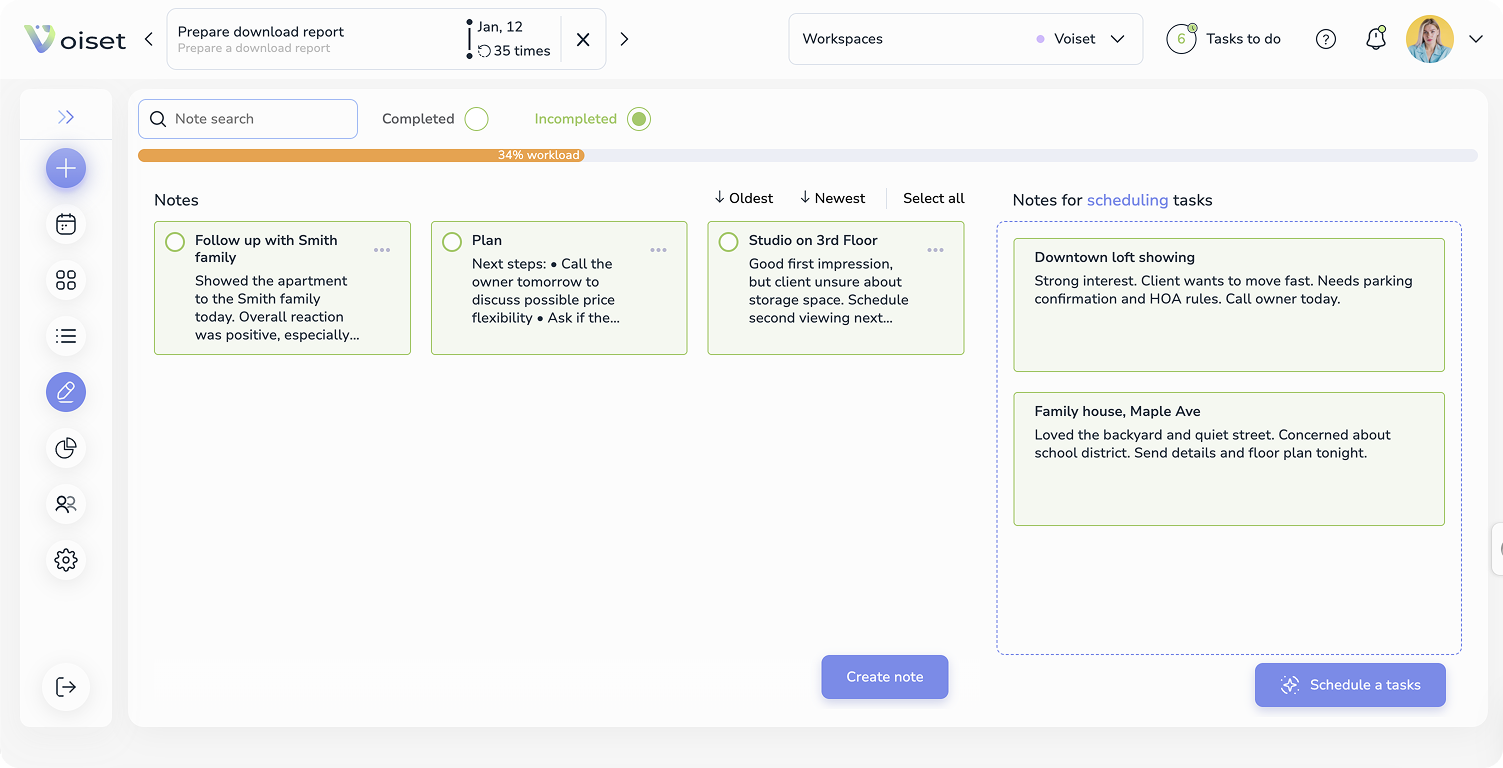
- Turns spoken input into clear notes and tasks
- Identifies follow-ups, timing, and priorities
- Places everything into your existing schedule and workflow
In other words, it connects the moment a thought appears with the moment it becomes action.
This is what makes an AI task manager different from a notes app or a standard task list. It doesn’t only act as an information store, it helps move work forward.
What it does well for real estate agents
Everyone can use AI, but it’s more about how and when you use it. Voiset works because it’s the removal of friction during the busiest parts of the day.
A well-designed AI assistant for real estate agents helps with things like:
- Capturing client feedback immediately after a showing
- Turning verbal commitments into scheduled follow-ups
- Keeping tasks linked to the right property or client
- Reducing the need to remember context later
Instead of juggling mental reminders, you offload them safely and immediately.
What it does not replace
It’s important to be clear about this. An AI task management tool is not a replacement for:
- Your CRM
- Your calendar
- Your email or messaging apps
Those tools are still super important. What voice-first AI does is support the space between them – the moments where information is created but not yet organised.
Tools like Voiset are designed to work with your existing systems, not against them. Meetings stay in your calendar. Deal records stay in your CRM. Voice-captured tasks and notes sit in between, keeping everything connected and current.
Why voice make a difference
Typing forces you to slow down and switch context. Voice allows you to stay in motion.
That’s why the idea of a voice notes to tasks platform is such a powerful shift for real estate work. You don’t need to decide how to phrase something or where it belongs. You just say it as you think it, while the context is still fresh.
This approach aligns naturally with how agents already work – and that’s why AI for real estate agents is becoming more about everyday productivity.
Real-world scenarios and how agents use voice-driven planning day to day
The easiest way to understand the value of an AI task manager is to look at how it fits into a normal working day. Not an ideal day. A real one – with back-to-back showings, calls in between, and very little quiet time.
Below are common situations where voice-driven AI task management makes a practical difference.
1. After a showing: Capture feedback while it’s still fresh
Most client feedback doesn’t arrive in a neat summary. It comes in fragments:
- “They loved the light.”
- “The kitchen felt small.”
- “They want to ask about parking.”
- “Price might be negotiable.”
This usually happens while walking out of the property or getting into the car. Typing at that moment is unrealistic, so agents rely on memory or quick notes.
With a voice-first AI assistant for real estate agents, the workflow looks different. Right after the showing, you speak naturally:
“Clients liked the layout but not the kitchen. Ask the owner about parking options. Follow up tomorrow morning.”
That single voice input is turned into voice notes to tasks – feedback stored with the property, follow-ups scheduled, and reminders placed into your calendar automatically. Nothing to rewrite later. No context lost.
2. After a call: Turn agreements into action immediately
Calls often end with verbal commitments:
- “I’ll send you the documents later.”
- “Let me check with the owner.”
- “We’ll speak again tomorrow.”
Without immediate capture, those promises sit in your head until something else pushes them out and they’re lost forever.
By using an AI task manager for realtors, you can summarise the call in one sentence as soon as it ends. The system identifies the action, sets a reminder, and links it to the right client or property. The task exists before the next call begins.
3. Managing a full day of showings and travel
A calendar full of appointments doesn’t show the full workload. There are calls to return, messages to send, and small tasks that fit into short gaps between meetings.
Voice-driven AI task management helps here by:
- Keeping follow-ups visible between appointments
- Scheduling tasks into realistic gaps
- Preventing double-booking or forgotten reminders
Instead of checking multiple apps, agents see one clear plan for the day that reflects both meetings and tasks.
4. Keeping context per property, not just per da
One of the hardest parts of real estate work is switching context. You might visit five properties in a row, each with different clients, concerns, next steps or areas.
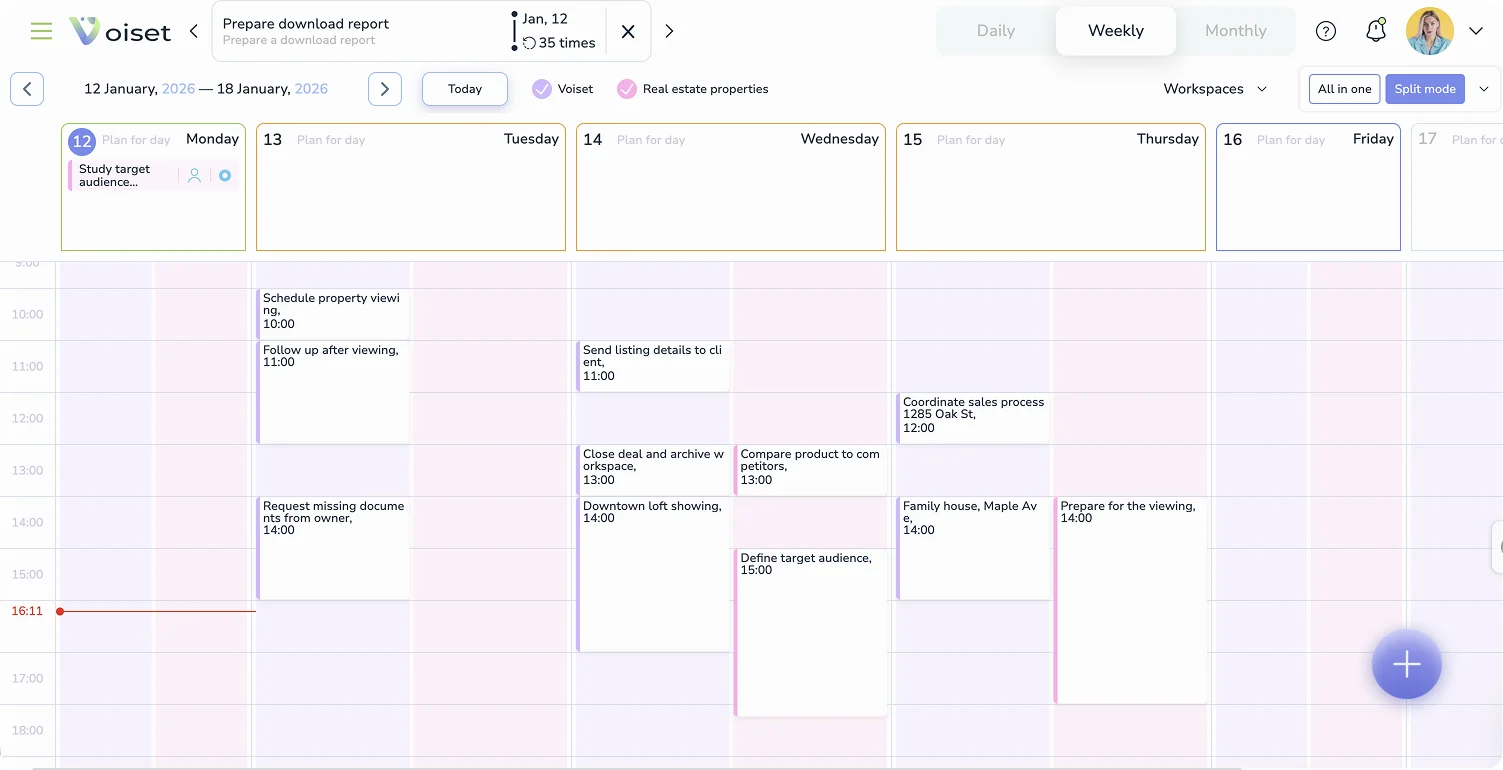
An effective AI assistant for real estate agents keeps tasks and notes tied to individual properties. When you open a listing, you see:
- Feedback from previous showings
- Open follow-ups
- Pending questions
- Preparation tasks for the next visit
This reduces mental load and makes it easier to pick up where you left off – even days later.
5. Preparing properties without forgetting the small things
Small details matter. Keys, light bulbs, documents, access instructions. Forgetting one can derail a showing.
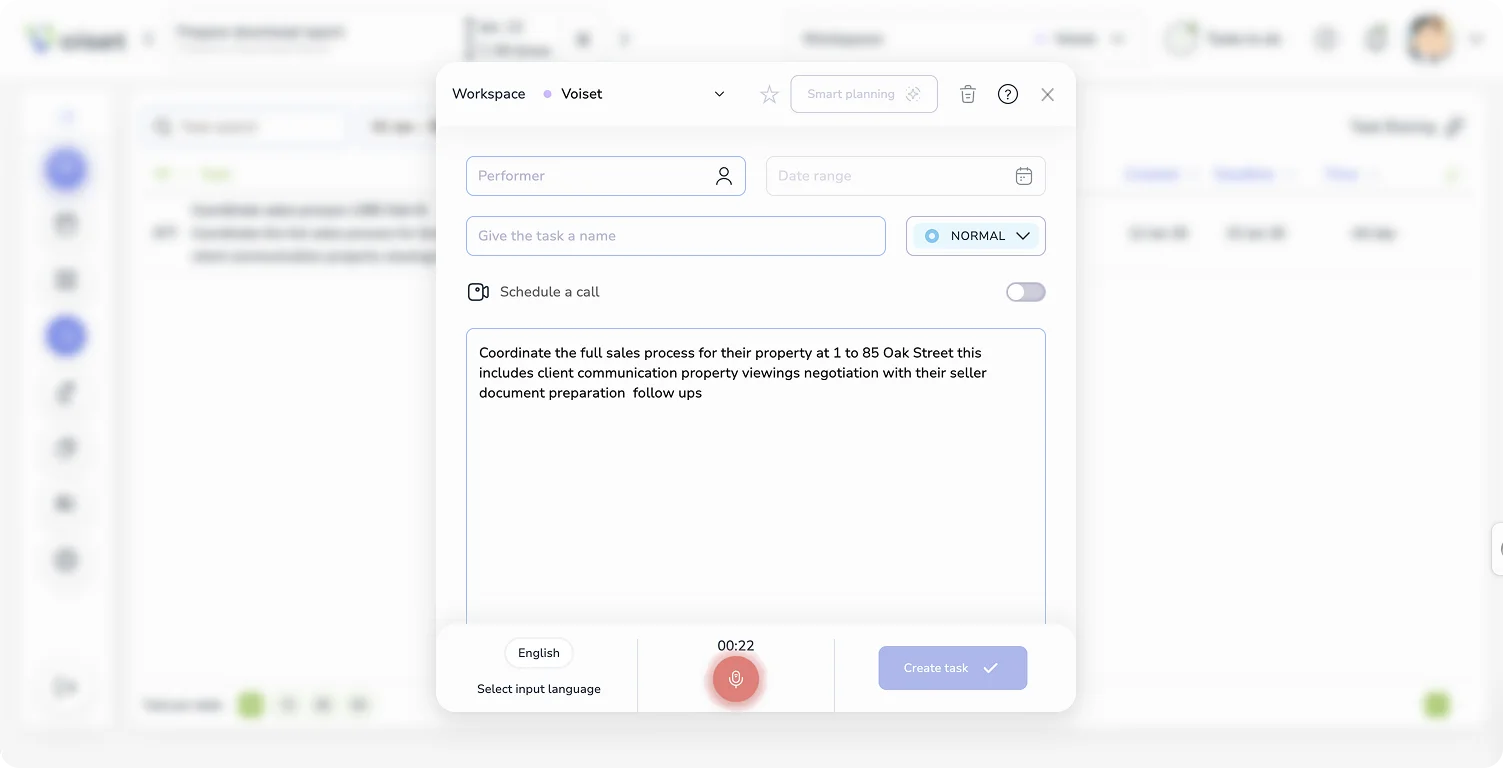
Instead of counting on memory, agents can dictate preparation tasks as they appear. These are automatically scheduled ahead of the next viewing, turning everyday observations into reliable checklists.
6. Sharing plans with assistants or co-agents
When working with others, clarity seriously matters. Voice-captured tasks and schedules can be shared per property or client, giving everyone the same view of what needs to happen next.
There’s no need to explain context twice. It’s already captured.
These scenarios all point to the same idea: the value of an ai task management tool isn’t automation for its own sake. It’s removing friction at the exact moments where work is usually lost.
How to evaluate an AI task manager for real estate
Not every tool that mentions AI is useful for real estate work. The market is flooded with them.
Some add complexity instead of reducing it. Others work well in theory but fall apart in the middle of a busy day. When evaluating an AI task manager for realtors, it helps to focus less on feature lists and more on how the tool behaves in real situations. The biggest opportunity is Voiset inside Claude via MCP.
Below is an easy checklist based on everyday agent workflows.
1. Voice capture that actually works in motion
Voice input should be fast, reliable, and natural. If you have to repeat yourself, correct transcripts, or speak in a specific format, the tool won’t survive real use.
A good system allows you to speak normally and still turns voice notes to tasks accurately – even in less-than-perfect conditions, like a car or stairwell.
Ask yourself:
- Can I capture a thought in under 10 seconds?
- Does it work hands-free?
- Does it handle follow-ups and reminders without extra steps?
2. Automatic task creation and scheduling
The real benefit of AI task management is not just capturing information, but acting on it.
Look for tools that:
- Detect follow-ups automatically
- Suggest or assign realistic times
- Place tasks directly into your calendar
If you still have to manually decide dates and priorities every time, the tool is only doing half the job.
3. Calendar integration that respects your existing setup
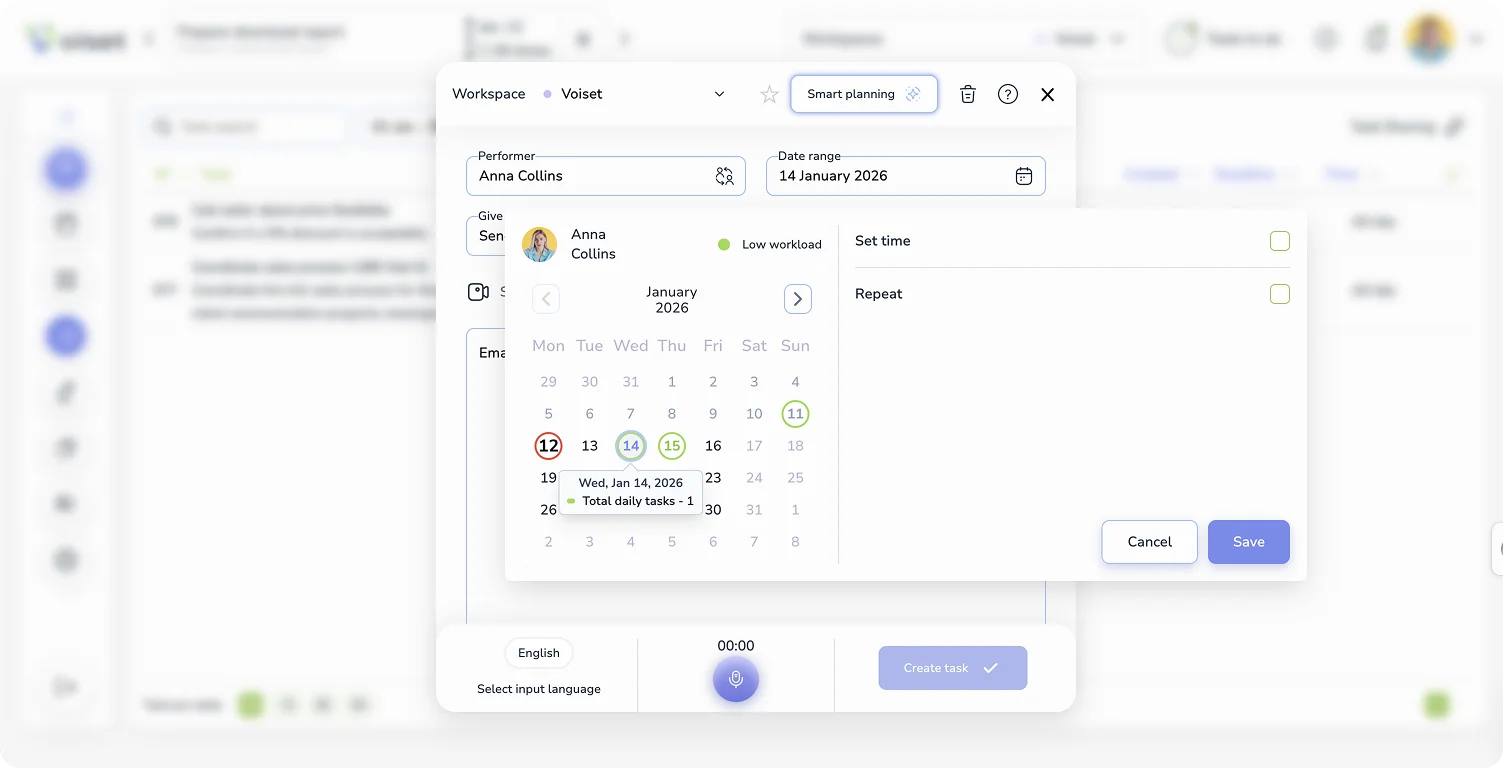
Agents already live in their calendars. Any AI task management tool should work with Google Calendar, Outlook, or Microsoft 365 – not try to replace them.
Strong integration means:
- Meetings stay where they are
- Tasks appear alongside appointments
- Changes sync automatically
This is especially important when managing travel time and short gaps between showings.
4. Organisation by property and client, not just lists
Generic task lists don’t reflect how real estate work is structured. Tasks need context.
An effective AI assistant for real estate agents lets you organise work by:
- Property
- Client
- Deal or transaction stage
This makes it easier to switch focus and prepare properly for each interaction.
5. Low learning curve and minimal setup
If a tool requires hours of configuration, it won’t stick. The best real estate productivity tools feel usable on day one.
Look for:
- Simple onboarding
- Clear defaults
- The ability to start small and build gradually
Voice-driven tools, in particular, should feel intuitive from the first use.
6. Works alongside your CRM, not against it
An AI task manager should complement your CRM, not compete with it.
Ideally, the tool helps you capture details quickly and then move them into your CRM when needed – without retyping or copying information manually.
7. Privacy and data control
Voice data and client information are sensitive. Make sure the tool is clear about:
- How data is stored
- Who has access
- Whether recordings are retained or deleted
For many agents, this is a deciding factor.
Common questions and objections about AI task management
Even when the benefits are clear, it’s normal to have some questions. Most real estate agents are careful about adding new tools – and rightly so. Below are some of the most common concerns that come up when considering AI task management for everyday work.
“Will this replace my CRM?”
No. And it shouldn’t.
A CRM is designed to store deal data, contacts, and transaction history. An AI task manager serves a different purpose. It helps you capture what happens between CRM updates – the quick decisions, follow-ups, and details that are easy to forget.
Think of it as a layer that sits alongside your CRM, not on top of it. You still use your CRM for records and reporting. Voice-driven tools help ensure that nothing important is lost before it ever makes it there.
“Is it safe to use voice notes for client information?”
This is a fair concern. Any AI assistant for real estate agents should be clear about how voice data is handled.
Before using a tool, it’s worth checking:
- Whether voice recordings are stored or deleted after processing
- How data is encrypted
- Who has access to your information
Used correctly, voice capture is no less secure than typing notes into a phone or sending messages to yourself – it’s simply faster.
“Won’t this take time to learn?”
The value of voice-driven AI task management is that it doesn’t require you to change how you think. You don’t need to learn commands or new workflows. You speak naturally, the same way you already leave voice notes or reminders.
Most agents find that once they use it a few times (especially after showings or calls) it quickly becomes part of their routine.
“What if I forget to use it?”
This is common at the beginning. New habits take time.
The main difference is that voice tools remove friction. When capturing a task takes just a few seconds, it’s easier to remember to do it. Over time, speaking your follow-ups out loud becomes as natural as locking the door after a showing.
“Does it work with my existing calendar?”
It should. A practical AI task management tool works with the calendar you already use, whether that’s Google Calendar or Outlook.
This matters because agents don’t want another place to check. Tasks and reminders should appear alongside showings and meetings, not in a separate system.
“Is this really necessary, or just another productivity trend?”
That depends on how you work.
If most of your tasks appear while you’re away from a desk, relying on memory or scattered notes eventually creates stress. In that context, AI for real estate agents is about aligning tools with reality.
From captured moments to consistent follow-through
Real estate work is built on small moments – comments after a showing, promises made on a call, ideas that appear while moving between appointments. When those moments aren’t captured, they quietly turn into missed follow-ups and extra stress.
Voice-driven AI task management helps turn those moments into action. By converting voice notes to tasks and organising follow-ups automatically, an AI task manager supports the way agents actually work – on the move, in real time, and across multiple listings.
If you want to see how a voice-first AI assistant for real estate agents fits into everyday workflows and saves 30% of your time, then explore Voiset today.
If you work in real estate, follow-ups are where deals often slip — especially when notes live across calls, texts, and scattered reminders. We put together a short guide on how agents can keep next steps visible using AI voice notes: How real estate agents can stop losing follow-ups with AI voice notes.

